


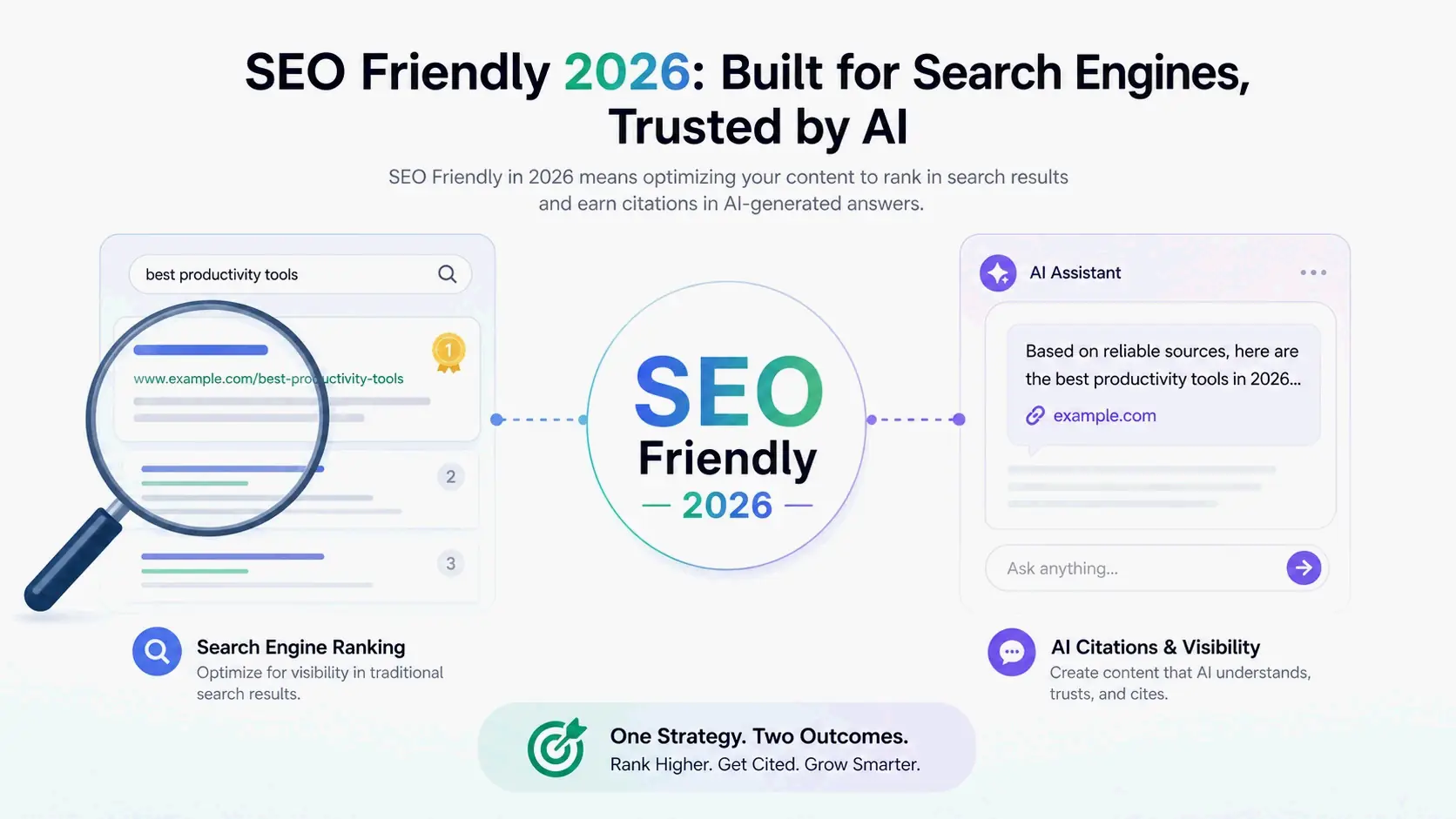
“SEO friendly” means designing a website so search engines can crawl, understand, and index its content without friction. In 2026, this definition has grown to cover AI-powered search experiences too — not just traditional Google optimization. The goal is structure that works for both ranking algorithms and AI-generated citations.
Contents
- What Does “SEO Friendly” Actually Mean in 2026?
- The Non-Negotiable Technical Foundation of an SEO-Friendly Website
- Core Web Vitals and Page Speed: The 2026 Performance Standards for SEO
- The AI Layer: How to Make Your Site’s Content “AI-Friendly” in 2026
- On-Page and Content Signals That Define an SEO-Friendly Page
- Your 5-Minute SEO-Friendliness Self-Assessment Checklist
- How to Fix an SEO-Unfriendly Website: A Practical Remediation Path
- Conclusion
- FAQ
What Does “SEO Friendly” Actually Mean in 2026?
At its core, SEO is about improving a website’s visibility in organic search results. Wikipedia describes it as the practice of increasing the quantity and quality of traffic from unpaid results, and that applies across web, image, video, news, and AI-assisted search interfaces. “SEO friendly” became a practical label for sites built from the ground up with those principles in mind.
A site qualifies as SEO friendly when search engines can get to its pages easily, parse the content correctly, and index it for relevant queries. That takes technical infrastructure, content quality, and user experience working in sync, and the layers depend on each other. You can’t fix thin content or missing structured data if a search engine can’t even crawl the page in the first place.
The point of building this way is simple: higher organic visibility and a better experience for real people. Sites that meet these standards pull in more qualified traffic, hold visitors longer, and convert more effectively than sites retrofitted for SEO later — or not optimized at all.
The Expanding Definition: From Crawler-Friendly to AI-Friendly
“SEO friendly” used to mean built for traditional search engines like Google and Bing. Today it stretches into a much bigger ecosystem of AI chatbots, voice assistants, and generative search experiences.
Wikipedia notes that generative AI tools — ChatGPT, Claude, Perplexity, Gemini — have started to shift how people find information online, with AI-generated answers taking space that used to belong to traditional results. Marketers now optimize for generative engine optimization (GEO), zeroing in on content structure, authority signals, and schema markup that helps a site become a trusted, citable source inside AI responses.
Google announced on May 20, 2025 that AI Mode would roll out to all U.S. users, using a “query fan-out technique” that breaks a search query into multiple sub-topics. That shift means an SEO-friendly website now has to serve traditional crawlers and AI retrieval systems at the same time.

The Non-Negotiable Technical Foundation of an SEO-Friendly Website
Technical health is the bedrock. If a site isn’t crawlable and indexable, none of its content or optimization work gets seen. Search engines discover pages through automated crawlers that follow links, building an index of what’s accessible.
How much the foundation matters becomes crystal clear when you look at the pace of change. Wikipedia points to Eric Schmidt’s 2010 statement that Google made over 500 algorithm changes that year — almost 1.5 per day. Algorithms have evolved plenty since then, but the principle stands: a site needs a standards-based, solid technical base that survives endless updates, not one that chases every tweak.
That base means a clear site architecture, mobile optimization, security protocols, and clean signals about which pages belong in the index. Sites that skip technical SEO risk burying great content where nobody — human or crawler — will find it.
Why a Flat Site Architecture is Critical for Crawling
Site architecture shapes how search engines discover and weigh content. A flat architecture keeps most important pages within two or three clicks of the homepage, flowing logically from homepage to category pages to individual detail pages.
Wikipedia’s SEO entry confirms that how far a page sits from the root directory influences whether it gets crawled. Content buried five or six clicks deep gets visited less often and eats up more crawl budget. That’s why the “three-click rule” sticks around as a useful guideline: no piece of important information should sit more than three clicks from the homepage.
A flat structure also helps PageRank move through the site efficiently. High-authority pages, like the homepage, pass ranking power to the pages they link to, spreading visibility across the domain. Deep, tangled hierarchies dilute that authority and make it harder for search engines to spot what matters.
Mobile-First Indexing: Why Your Site’s Mobile Version Dictates Rankings
Google uses the mobile version of a site for indexing and ranking. That shift started in November 2016, and Wikipedia confirms that mobile devices now drive the majority of Google searches.
Content parity between mobile and desktop versions matters just as much as visual layout. If your mobile version hides content inside collapsed tabs that Googlebot never renders, that content won’t get indexed. Fonts need to be readable without zooming, tap targets should be at least 48×48 pixels, and the viewport meta tag has to be set correctly. Google Search Console and Google’s Mobile-Friendly Test can flag these gaps before they cost you rankings.
The Security Baseline: HTTPS and Canonical URLs
HTTPS is a confirmed Google ranking signal, and modern browsers actively warn visitors when they land on HTTP pages. Those warnings eat trust before anyone reads a headline. Securing the site means installing an SSL certificate, setting up 301 redirects from HTTP to HTTPS, updating internal links, and making sure canonical tags point to the HTTPS version of every URL.
Canonical URLs prevent the duplicate content issues that dilute ranking power. Common causes include HTTP vs. HTTPS variants, trailing slash vs. no trailing slash, and filtered or sorted URL parameters on product pages. As Wikipedia explains, URL canonicalization — whether through a canonical link element or a 301 redirect — makes sure links to different versions of the same URL all count toward the page’s link popularity score. Add a self-referencing canonical tag to every page, even when only one version seems to exist.
Core Web Vitals and Page Speed: The 2026 Performance Standards for SEO
Core Web Vitals are three specific metrics Google uses to measure real-world user experience: loading performance, interactivity, and visual stability. They work as direct ranking signals and as proxies for overall experience quality.
Brandleap Agency outlines the 2026 targets that define a healthy SEO-friendly performance baseline: Largest Contentful Paint (LCP) under 2.0 seconds, Interaction to Next Paint (INP) under 200 milliseconds, and Cumulative Layout Shift (CLS) under 0.1. Google tightened the LCP threshold recently, and many 2026 guidance sources now treat 2.0s as the new mark — meaning sites that were comfortably in the “good” zone at 2.5 seconds may have fallen behind without realizing it.
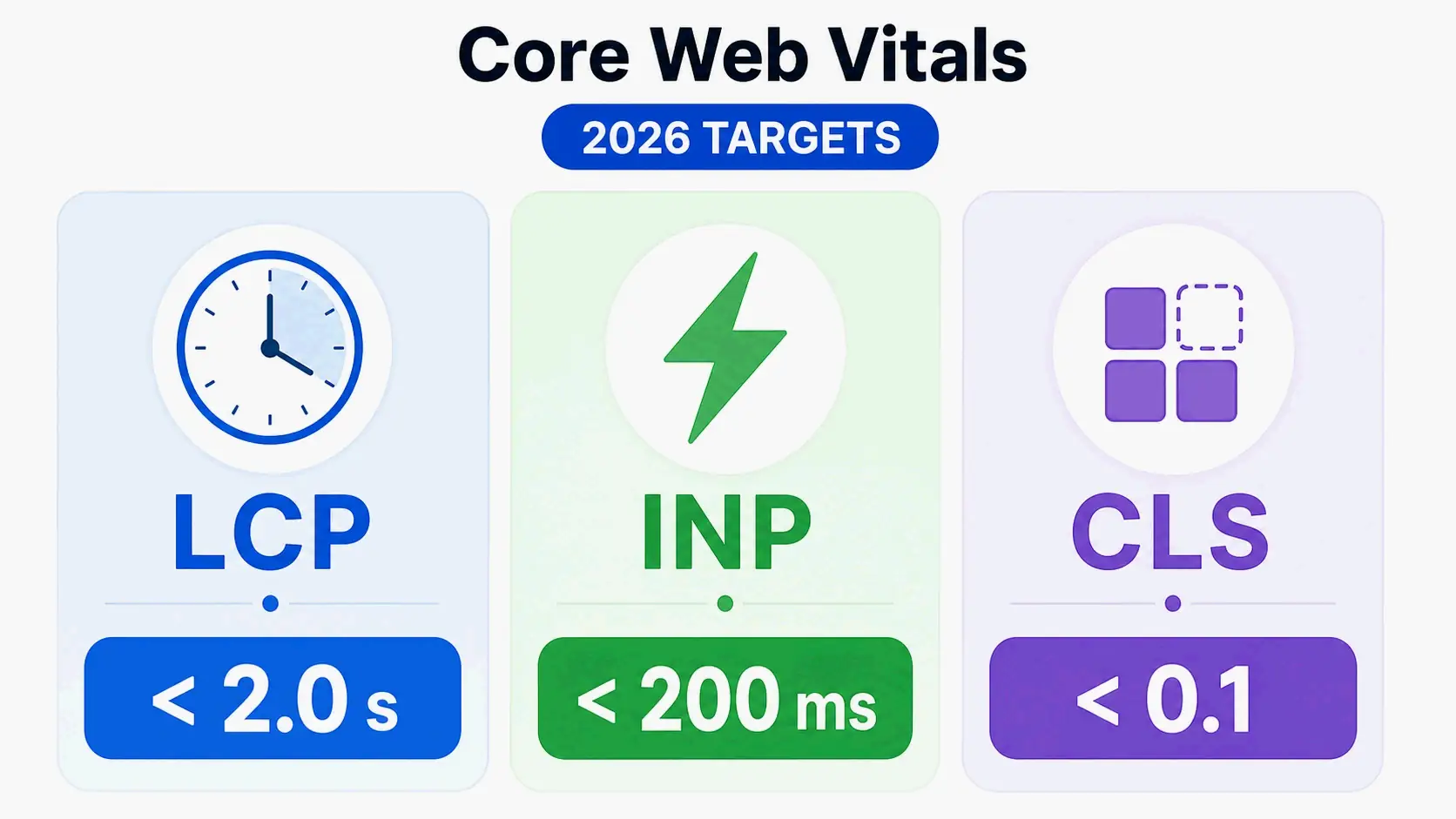
Google measures these metrics using real-world field data at the 75th percentile over a rolling 28-day window, not lab simulations. To get the benefit, at least 75% of actual visits need to score “good.” If INP sits under 150ms, the site is competitive; once it climbs above 200ms, ranking ground starts slipping away.
LCP, INP, and CLS: What They Measure and How to Fix Them
Largest Contentful Paint measures how quickly the main content loads. To improve LCP, aim for under 2.0 seconds. Common fixes include moving to a managed hosting provider, adding a Content Delivery Network, compressing images, and stripping out unnecessary third-party scripts. Image optimization directly lifts LCP scores, so it’s a performance fix as much as an aesthetic one.
Interaction to Next Paint measures how fast a page responds to clicks, taps, and key presses. The under-200ms target means the site has to feel genuinely interactive, not just visually loaded. Reducing JavaScript execution time and breaking long tasks into smaller chunks helps keep INP low.
Cumulative Layout Shift measures visual stability — whether things jump around as the page loads. Hitting a score under 0.1 means reserving space for images, ads, and embeds with explicit width and height attributes, and avoiding content injected above existing elements after the page first appears.
Beyond the Score: The User Experience Impact of Page Speed
Page speed ripples into real behavior. Visitors often leave sites that take too long to load, which translates directly into lost opportunities. A slow site also tends to have a higher bounce rate, and that indirectly tells Google the result wasn’t good for the user. Fast sites deliver better experiences and often improve both engagement and search performance. The scores matter, but what search engines ultimately reward is the user satisfaction underneath them.
The AI Layer: How to Make Your Site’s Content “AI-Friendly” in 2026
Traditional SEO makes content accessible to Google’s crawlers for indexing and ranking. AI-friendly optimization goes a step further: it structures content so large language models can reliably pull out information, summarize it, and cite the source. Being “crawler-friendly” isn’t the same as being “AI-friendly.”
The difference matters because AI-powered search experiences are rapidly displacing traditional results. Wikipedia notes that digital marketers now develop optimization approaches for LLM-based search — often called generative engine optimization (GEO) or answer engine optimization, terms used almost interchangeably. The objective shifts from earning a spot in a list of links to becoming a named, cited source inside an AI-generated response.
For AI systems to cite content accurately, sites need clear, authoritative, and well-structured information: proper heading hierarchies, direct answers to common questions placed early on the page, and technical accessibility for AI-specific crawlers like GPTBot, ClaudeBot, and PerplexityBot alongside traditional search bots.
SEO Locale points out, when evaluating genuinely SEO-friendly themes, they should ship with valid structured data, one H1 per template, correctly sized and lazy-loaded images, and a JavaScript payload light enough to pass Core Web Vitals on a mid-range device. Those same characteristics — lean code that clears Core Web Vitals — also serve as prerequisites for effective AI parsing.
Crawler-Friendly vs. AI-Friendly: Understanding the Key Differences
Crawler-friendly optimization makes sure search engines can find and index pages. AI-friendly optimization makes sure AI models can extract meaning, context, and reliable facts from those pages. Traditional SEO competes for ranking positions in a link list; GEO competes to be one of the sources an AI model pulls from and mentions, regardless of whether anyone clicks through afterward.
The technical overlap is large: both depend on crawlable HTML, fast load times, and a clear page structure. But AI-friendly optimization adds a sharper focus on content built for machine extraction — direct answers, bullet-point summaries, FAQ sections, and schema markup that gives machine-readable confirmation of what the page contains. Freshness also weighs more heavily for AI citation; dated, regularly updated content signals relevance to AI retrieval systems.
The Role of llms.txt and Structured Content in Generative Engine Optimization (GEO)
The llms.txt file is a voluntary convention gaining traction through 2026 for guiding AI crawlers. Placed at the root of a website (yoursite.com/llms.txt), it provides a plain Markdown summary of what the site is about and which pages matter most — a curated briefing for AI systems, unlike the noise of full webpages with navigation, ads, and cookie banners.
Proposed in 2024 and outlined at llmstxt.org, the file includes a short brand summary of two to four sentences, a curated list of 10 to 20 top pages grouped by topic with one-line descriptions, and it serves as a low-effort way to help AI tools understand a site faster. Unlike robots.txt, it doesn’t control crawler access — it simply guides AI systems that choose to use it.
Structured content amplifies this technical signal. Clear heading hierarchies, FAQ sections, and well-organized information make it easier for AI models to parse content accurately. Combined with schema markup for machine-readable confirmation, these elements raise the chances that AI-generated answers will cite the site as a primary source.
On-Page and Content Signals That Define an SEO-Friendly Page
On-page elements speak directly to search engines about what a page contains and why it’s relevant for specific queries. Title tags, heading structures, meta descriptions, internal linking patterns, and schema markup all work together to help search engines understand context, hierarchy, and topical relevance.
Content quality, of course, determines whether visitors stay. Search engines prioritize pages that provide useful, original, and informative content that matches user intent. As Google’s own guidance emphasizes, the focus should be on creating helpful, people-first content — not content engineered solely for rankings.
The Perfect SEO-Friendly Page: Title Tags, Headings, and Meta Descriptions
Title tags act as a ranking signal. Brandleap Agency notes the widely accepted best practice: keep them between 50 and 60 characters with the primary keyword placed near the front. These aren’t hard technical limits, but consistently ignoring them costs visibility.
Headings provide the skeleton. Each page needs one clearly designated H1 that signals the primary topic. Beneath it, H2s and H3s map the topical structure of the page — they’re not just visual spacers. When headings follow a logical H1 → H2 → H3 hierarchy, Google can extract structured answers for featured snippet placements at position zero.
Meta descriptions don’t directly influence rankings, but they drive click-through rates when they appear in search results. A well-written meta description of 155 to 160 characters with a natural call to action is part of SEO-friendly design, even though it’s invisible on the page itself. Make each page’s description unique to avoid confusion in search listings.
Internal Linking as an SEO and UX Power Tool
Internal linking helps build a web of topical authority across a site. Contextual links inside body content pass relevance signals between pages. Anchor text like “SEO consulting process” tells a crawler far more than “click here” because it directly describes what the destination page covers.
Varying anchor text — mixing exact-match, partial-match, and semantic synonyms — mimics natural language and avoids over-optimization signals. When you publish new content, add a few relevant internal links from existing pages, and then go update those older pages to link back. That distributes PageRank through the site.
Internal linking also improves the user experience. Links between related pages encourage visitors to explore further, which increases time on site and reinforces the site’s authority on connected topics.
How Schema Markup Helps Search Engines “See” Your Content
Schema markup provides structured data that helps search engines understand the context of page content, transforming standard results into rich results with extra information. Common schema types include Organization, LocalBusiness, Article, FAQ, Product, and Breadcrumb.
Brandleap Agency recommends JSON-LD as Google’s preferred format because it sits in the page head without touching the visual layout. Run all structured data through Google’s Rich Results Test before pushing it to production.
Schema also supports AI-powered search. AI models lean on structured data to pull facts, and using schema makes it easier for those systems to cite the site as a primary source. For local businesses, LocalBusiness schema — using the most specific subtype available — is essential for showing up in local search results.
Your 5-Minute SEO-Friendliness Self-Assessment Checklist
This quick audit needs no expertise and helps you zero in on the biggest gaps in your site’s SEO-friendliness. The binary yes/no questions below focus on crawlability, performance, security, and search visibility — the foundational layers that unblock everything else. Use the recommended free tools to get real data instead of guessing.
Brandleap Agency suggests starting with performance and crawlability checks because they carry the highest leverage. If Google can’t crawl a page or your site takes six seconds to load, every other optimization is dead on arrival. Work through the questions in order and make a note of any “No” answers so you know what to prioritize.
6 Yes/No Questions to Diagnose Your Site Right Now
1. Is your site secure with HTTPS enabled? Check your URL in a browser. If the address bar shows a padlock icon and begins with “https://”, your site passes. If it shows “Not Secure” or begins with “http://”, install an SSL certificate and set up 301 redirects from HTTP to HTTPS. Tool: Browser address bar (direct observation).
2. Can Google find and index your pages? Log into Google Search Console and check the Index Coverage report. If important pages show as “Indexed” and submitted, this passes. If pages appear under “Excluded” or show crawl errors, fix the underlying issues — typically robots.txt blocks, noindex tags, or server errors. Tool: Google Search Console (free).
3. Does your site meet Core Web Vitals targets? Run PageSpeed Insights and check whether LCP, INP, and CLS scores show green across both mobile and desktop. The 2026 targets are LCP under 2.0 seconds, INP under 200ms, and CLS under 0.1. Tool: PageSpeed Insights (free).
4. Is your mobile experience functional and content-complete? Use Google’s Mobile-Friendly Test and manually inspect key pages at 375px width. Check that font sizes are readable without zooming, tap targets are at least 48×48px, and no important content is hidden or collapsed. Tool: Mobile-Friendly Test (free).
5. Does each page have a unique, descriptive title tag and meta description? Use Screaming Frog’s free version to crawl up to 500 URLs and check for missing, duplicate, or over-length title tags and meta descriptions. Every indexable page should have a unique title under 60 characters and a meta description between 150 and 160 characters. Tool: Screaming Frog SEO Spider (free up to 500 URLs).
6. Have you implemented basic schema markup? Run your homepage and a key service page through Google’s Rich Results Test. Organization or LocalBusiness schema should be detected without errors. If the test shows no structured data detected, implement JSON-LD schema for your business type immediately. Tool: Rich Results Test (free).
How to Fix an SEO-Unfriendly Website: A Practical Remediation Path
Sites not originally built with SEO in mind often run into structural problems that are hard to unwind later. The toughest category involves JavaScript-heavy sites built with frameworks like React or Angular that lean on client-side rendering. These applications frequently hit indexing gaps that directly shrink organic visibility.
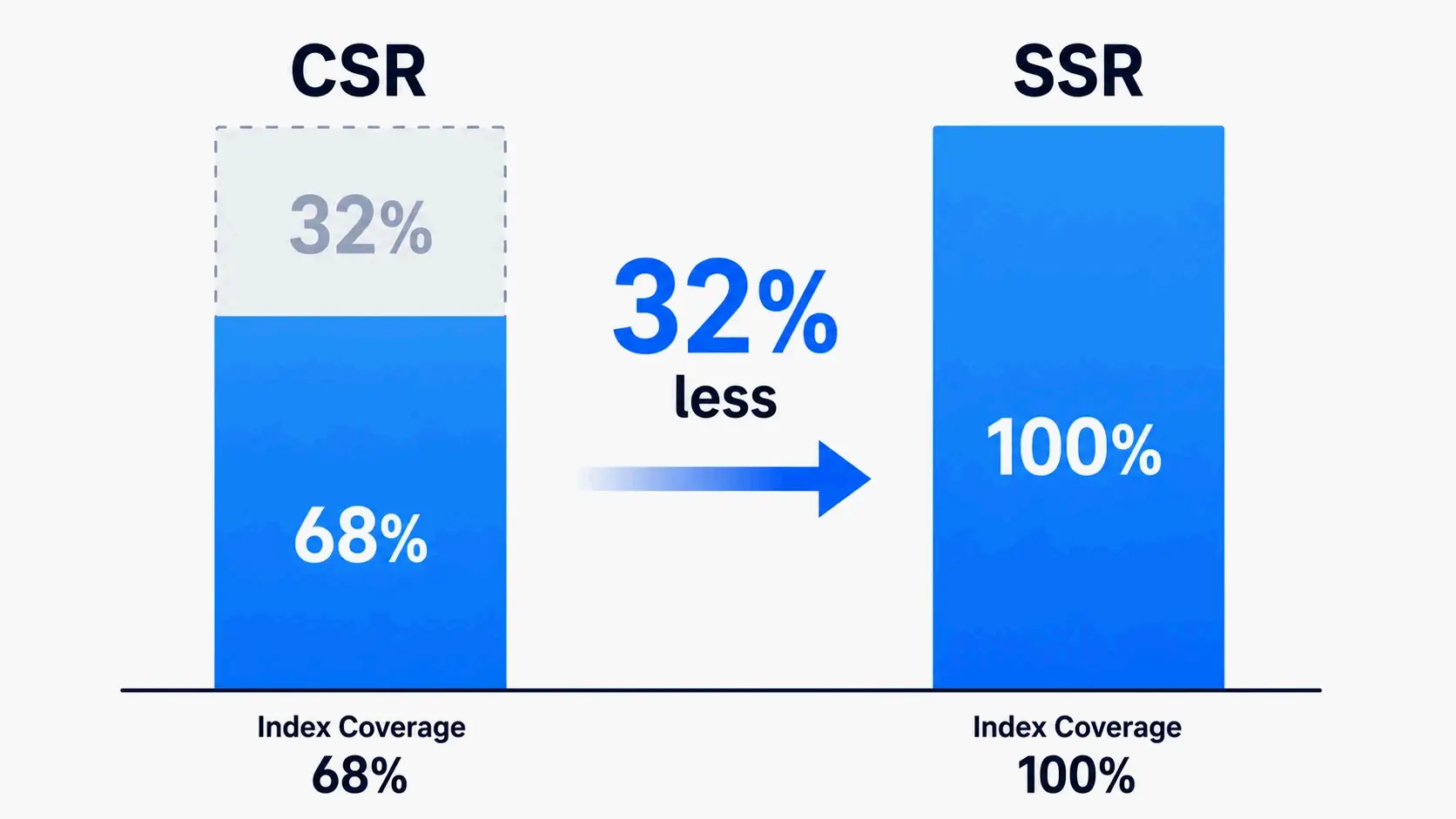
Research from Onely found that fully client-side-rendered websites have, on average, 32% less content indexed by Google compared to similar server-side-rendered sites. That number makes a persistent problem concrete: search engines can render JavaScript, but indexing is often delayed and less thorough than with server-rendered HTML.
The fix depends on your architecture and business goals. For content-dependent sites where organic search drives growth, moving toward server-side rendering or static generation usually delivers the strongest SEO results. For interactive applications where SEO is secondary, hybrid approaches let you balance functionality with search visibility.
Case Study: Moving from Client-Side Rendering (CSR) to Server-Side Rendering (SSR)
Client-side rendering loads content through JavaScript after the page opens. That works well for heavily interactive dashboards, but it delays when search engines see the content. Google can process JavaScript, but as The Tech Clouds notes, JavaScript alone can’t guarantee content will be crawled, indexed, ranked, or drive meaningful traffic.
Server-side rendering generates page content on the server before delivering it to users. Since search engines receive complete HTML right away, SSR generally offers stronger SEO performance for public-facing pages. Content-dependent businesses that switch from CSR to SSR typically see faster indexing and more thorough coverage of their content in search results. That Onely finding — 32% less indexed content with CSR — gives a concrete benchmark for the size of the improvement.
SSR vs. SSG vs. Hybrid: Choosing the Right Approach for Your App
Server-Side Rendering generates pages on each request, making it a strong fit for dynamic content that changes often and for businesses that depend on organic search, content marketing, or lead generation.
Static Site Generation creates pages during the build process. These pages load quickly and work well for blogs, documentation, and marketing sites that don’t change frequently. SSG often delivers excellent Core Web Vitals scores because the pages are pre-built.
Hybrid Rendering blends multiple approaches. Public marketing pages use SSR or SSG for search visibility, while authenticated dashboards rely on CSR for interactive user experiences. According to The Tech Clouds, for most B2B organizations, hybrid rendering offers the best balance between marketing performance and application functionality.
The decision tree is simple: pick SSR if organic search drives your business, stick with CSR for internal tools where SEO doesn’t matter, and go hybrid when you need both strong search visibility and dynamic user experiences. Costs and benefits vary with implementation complexity, hosting requirements, and development resources.
Conclusion
Being “SEO-friendly” in 2026 isn’t a one-and-done checklist. It’s an ongoing commitment to technical health, high-quality content, and a great user experience — and now it extends into the world of AI-powered search. The definition has grown from purely crawler-focused optimization to include structured content that AI models can reliably extract and cite as trusted sources.
Start with a technical audit using the five-minute checklist above. Fix crawlability issues and Core Web Vitals thresholds first; they’re the foundation everything else rests on. Performance and indexability problems block every optimization that comes later. Once you’ve resolved those, you’ll have a stable base to build on with content, structured data, and AI-specific improvements.
FAQ
How long does it take for an SEO-friendly website to rank on Google?
There’s no fixed timeline — it can take weeks to months. Ranking speed depends on domain authority, competition, content quality, and how efficiently your crawl budget is used. A technically sound, SEO-friendly site can get indexed faster, but authority and content value determine where it lands over time.
Are JavaScript frameworks like React or Angular SEO-friendly?
Not by default, because they often rely on client-side rendering. They can be made SEO-friendly by implementing Server-Side Rendering or Static Site Generation. Google can render JavaScript, but indexing is frequently delayed and less comprehensive than with server-rendered HTML.
Can a website be both visually stunning and SEO-friendly?
Yes. SEO-friendly principles like fast load times, clear heading structures, and crawlable text are foundational to good user experience. The key is avoiding heavy, uncompressed images and JavaScript bloat. Modern development techniques prioritize performance alongside aesthetics.
Are popular CMS platforms like WordPress and Squarespace SEO-friendly by default?
They provide a solid, SEO-friendly foundation with features like clean permalinks, auto-generated sitemaps, and mobile-responsive themes. But real SEO-friendliness still hinges on user choices: installing a heavy, poorly coded theme or neglecting Core Web Vitals can quickly undermine the platform’s built-in advantages.
Is being “SEO-friendly” just a set of Google guidelines, not strict rules?
It’s a set of best practices and confirmed ranking factors — not strict rules in a legal sense. Ignoring them, though, leads to poor crawling and indexing, and ultimately low or no organic visibility. In practice, that makes the site invisible to search-driven traffic.
