


If you need to edit photos, write copy, or analyze data, a solid library of copy-paste ChatGPT prompts is the quickest way to get professional results. Just swap in your details and go.
Contents
- Why Generic Prompts Fail: The Difference Between Asking and Engineering
- 50+ Copy and Paste ChatGPT Prompts for Every Task (GPT-5.5 Optimized)
- How to Debug and Fix a Failing Prompt: A Step-by-Step Checklist
- Real-World ROI: How a Small Business Turned a Downturn Around with AI Prompts
- Trust but Verify: The Golden Rules for Editing Any AI Output
- Conclusion
- FAQ
Why Generic Prompts Fail: The Difference Between Asking and Engineering
Most people treat ChatGPT like a search engine—toss it a loose question and hope something useful comes back. The output matches the input: generic, shallow stuff that needs heavy rewriting. A structured prompt template flips that. It gives the model exactly what it needs to produce professional-grade work on the first shot.
The jump from mediocre to exceptional isn’t about clever wording. It’s about specificity, context, and clear boundaries. When you treat a prompt like an engineering spec instead of a casual question, the AI responds with far better accuracy and relevance.
Imtiaz Rayhan, Founder & Editor at SurePrompts, puts it simply: “The gap between a mediocre prompt and a great one isn’t cleverness — it’s specificity.” That holds true whether you’re writing, editing images, or digging into complex data.
Research from SurePrompts shows that structured prompts—ones that assign a role and specify an output format—generate usable, ready-to-paste results about three times as often as one-line questions. Over weeks of daily professional use, that efficiency gap stacks up fast.
The ‘Vague vs. Specific’ Prompt Showdown
Look at two ways to tackle the same task. A vague prompt like “Write me a cold email to a sales lead” gives ChatGPT almost nothing to work with. You get a template that sounds like every other unread email clogging a prospect’s inbox.
A structured version turns the request into something actionable: “You are a B2B sales copywriter. Write a cold outreach email from me, a founder at a 10-person analytics startup, to a Head of Marketing at mid-market SaaS companies. The goal is to book a 15-minute call. We help them cut reporting time in half. Keep it under 120 words, no jargon, one clear ask, a subject line under 50 characters, and an opening line that isn’t ‘I hope this finds you well.’ Provide the subject line and body separately.”
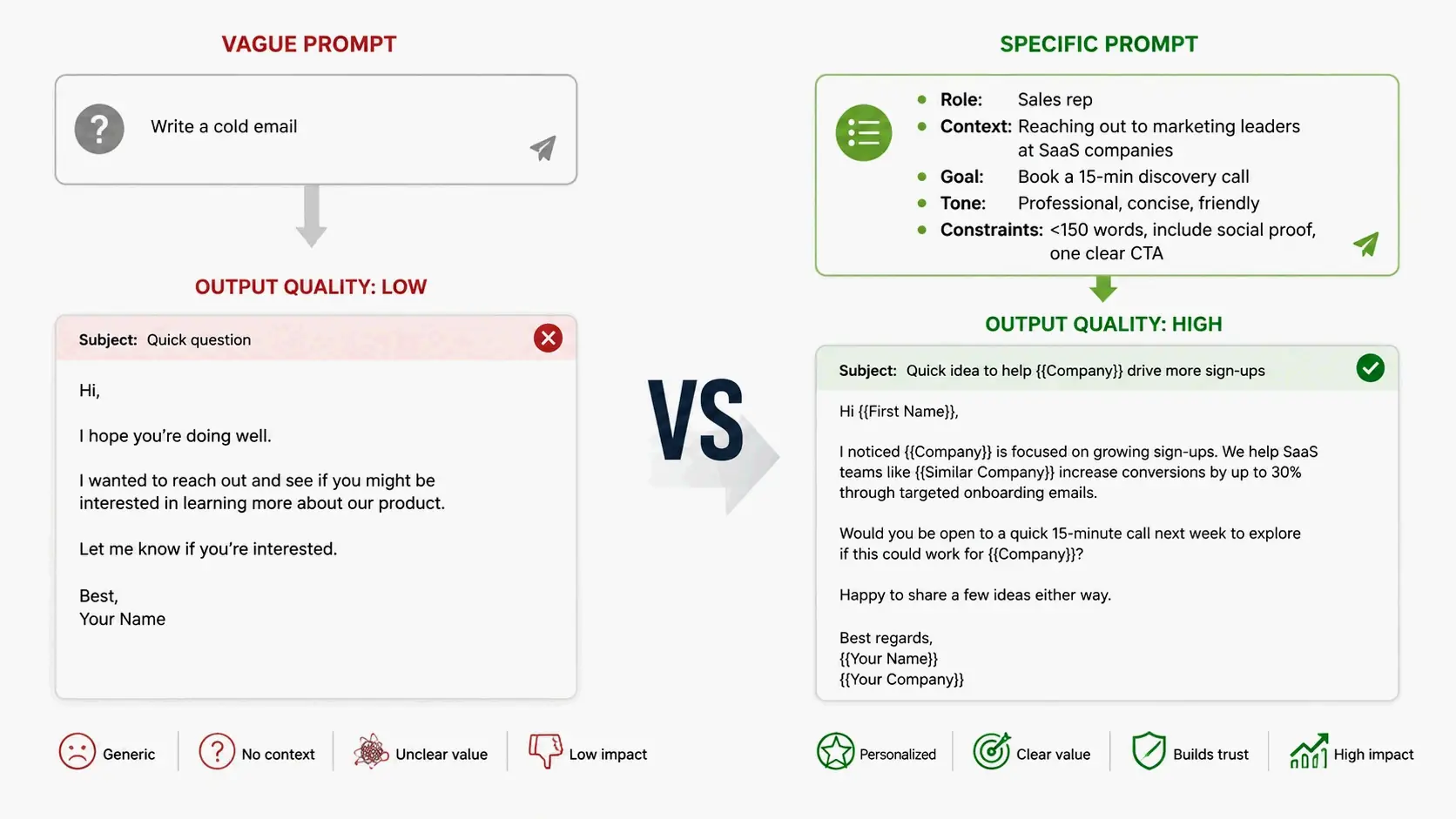
The difference is night and day. The first prompt returns filler. The second—shared by SurePrompts—hands you something you could actually send. It packs in role assignment, audience context, word limits, and formatting instructions. Everything the model needs to deliver professional output.
The Anatomy of a Perfect Prompt Template
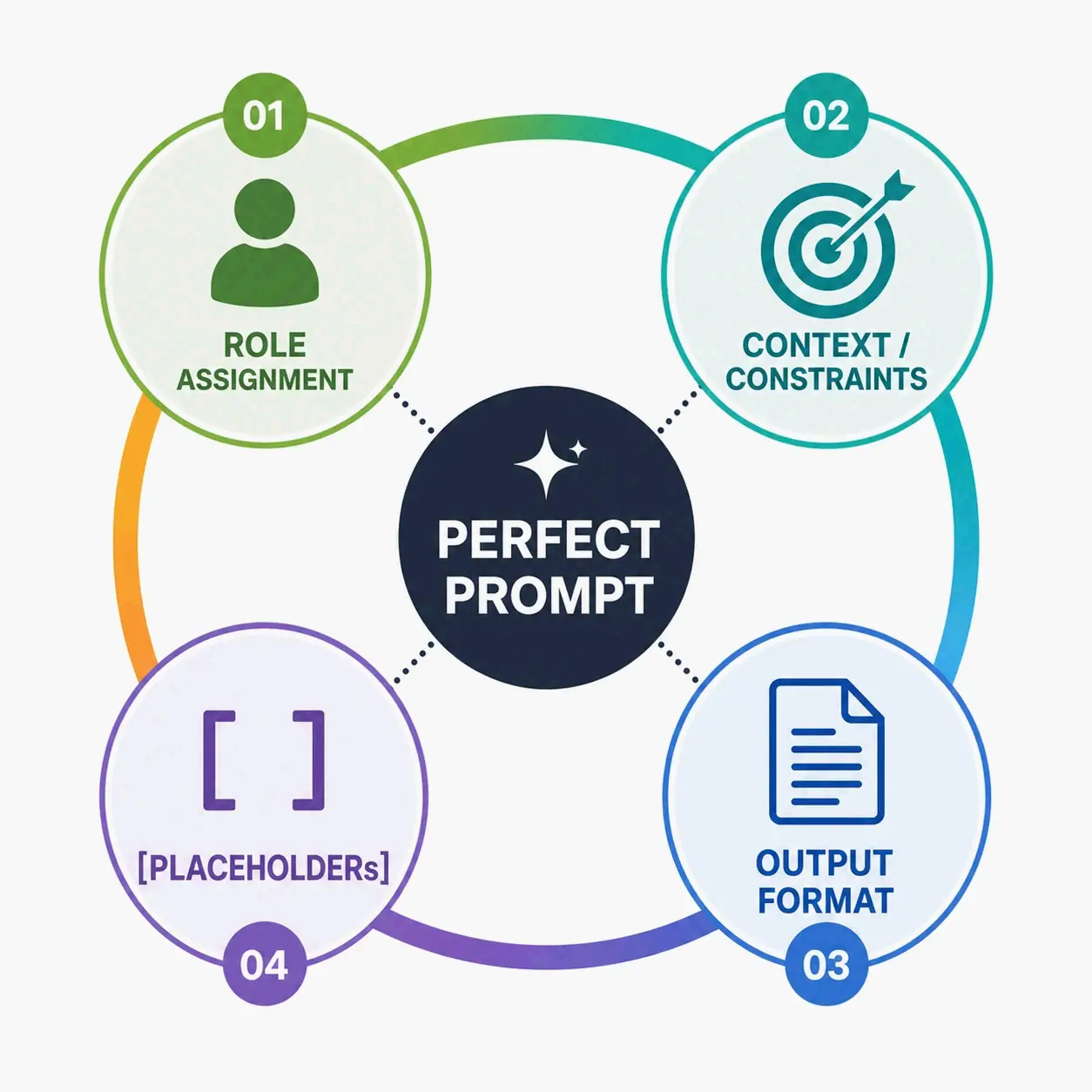
Effective copy-paste ChatGPT prompts all follow a similar structure. First, they assign a role. Telling the AI who to be sharpens everything that follows. “You are a senior copywriter specializing in B2B SaaS” gives you tighter output than no framing at all because the model adopts that role’s vocabulary, priorities, and conventions.
Second, they provide context and constraints. ChatGPT can’t read your mind. Laying out the audience, goal, tone, and length avoids the back-and-forth where you keep re-prompting to fix basic problems. “Write for non-technical executives, keep it under 150 words, professional but warm” gives the model clear guardrails.
Third, they spell out the output format. Asking for a table, a numbered list, a draft with headings, or “three options labeled A, B, and C” means the response lands ready to paste into your document—not as a wall of text you’ll need to reorganize.
Finally, good templates use placeholder brackets. That’s the trick that turns a generic instruction into something personal. Swapping [TARGET AUDIENCE] for “first-time home buyers in their 30s” transforms the output from theory into something immediately useful.
50+ Copy and Paste ChatGPT Prompts for Every Task (GPT-5.5 Optimized)
Below is a prompt library organized by task category. Each one works as a template—copy it, replace the bracketed placeholders with your specifics, and paste it into ChatGPT. These templates are tuned for GPT-5.5, which can chain tools together: a single prompt coordinates web search, code execution with Code Interpreter, and image generation with DALL-E in sequence.
For Writing & Content Creation
Writing tasks gain the most from structured prompts because vague requests produce the blandest output. These templates give ChatGPT the constraints it needs to deliver specific, usable drafts.
Blog Post Outline
You are an experienced content strategist. Create a detailed outline for a blog
post titled "[POST TITLE]" aimed at [TARGET AUDIENCE]. The post should achieve
[GOAL — e.g., explain a concept / drive sign-ups / rank for a keyword].

Provide: a one-sentence angle that differentiates this post from competitors,
a suggested word count, an H1, 5–7 H2 sections each with 2–3 bullet sub-points,
and a closing CTA idea. Keep the tone [TONE] and avoid generic filler sections.
Rewrite for Clarity
You are a professional editor. Rewrite the text below to be clearer and more
concise without changing its meaning or removing any factual detail. Cut filler
words, break up long sentences, and use plain language a [AUDIENCE] would
understand. Keep the original tone.

Return the rewritten version first, then a short bullet list of the main changes
you made and why.

Text:
"""
[PASTE YOUR TEXT HERE]
"""
Headline Variations
You are a direct-response copywriter. Write 10 headline options for
[PRODUCT / ARTICLE / OFFER]. The audience is [TARGET AUDIENCE] and the main
benefit is [KEY BENEFIT].

Give me a mix: 3 curiosity-driven, 3 benefit-driven, 2 question-based, and
2 number/list-based. Keep each under 70 characters. Present them in a numbered
list, grouped by type with a bold label for each group.
Social Media Caption Pack
You are a social media manager. Write 5 [PLATFORM — e.g., LinkedIn / Instagram]
captions promoting [TOPIC OR POST]. Brand voice is [VOICE — e.g., witty, expert,
warm]. Each caption should have a strong first line that stops the scroll,
deliver one clear idea, and end with a soft call to action.

Include 3–5 relevant hashtags per caption. Vary the angle so none of the 5 feel
repetitive. Number them.
Product Description
You are an e-commerce copywriter. Write a product description for [PRODUCT NAME],
a [PRODUCT TYPE]. Key features: [LIST 3–5 FEATURES]. Target customer:
[CUSTOMER]. Main pain point it solves: [PAIN POINT].

Structure it as: a punchy one-line hook, a 40–60 word benefit paragraph (sell the
outcome, not just features), and a bulleted feature list with each feature framed
as a benefit. Tone: [TONE]. Dodge hype words like "revolutionary" and "game-changing."
Tone Adjuster
You are an expert writer with a precise ear for tone. Take the text below and
produce 3 versions of it: one [TONE A — e.g., formal and authoritative], one
[TONE B — e.g., casual and friendly], and one [TONE C — e.g., bold and punchy].

Keep the core message identical across all three. Label each version clearly and
keep them roughly the same length as the original.

Text:
"""
[PASTE YOUR TEXT HERE]
"""
For AI Image Generation & Editing
ChatGPT’s image editing has grown a lot. With DALL-E built in and native image tools, a well-crafted prompt can transform photos, create visuals from scratch, and apply complex style transfers. According to Fotor’s guide published June 12, 2026, ChatGPT now works as an all-around image generator and editor, and its editing features have quickly caught on because they’re convenient and genuinely useful.
Photo to Studio Ghibli Style
Transform this photo into a Studio Ghibli–inspired illustration. Use soft pastel colors,
hand-painted textures, and gentle lighting reminiscent of classic Ghibli films. Add dreamy
backgrounds, subtle atmospheric details like drifting clouds or light rays, and a warm,
nostalgic mood. Keep the main subject recognizable but stylized with expressive features
and delicate outlines.
Funko Pop Figure Conversion
Convert the person in the photo into a Funko Pop-style figure inside a box, shown in
isometric view. The packaging features the title [specify the text]. Inside, include a
chibi-style figure modeled after the person, along with their [specify essential
accessories, e.g., pistol, wristwatch, suit, or signature items]. Beside the box, display
a realistic 3D rendering of the figure outside the packaging, with detailed textures
and lighting for a lifelike product presentation.
Background Replacement
Replace the background of this image with [describe your desired background — e.g.,
a minimalist white studio, a tropical beach at sunset, a futuristic neon cityscape].
Keep the subject sharp and well-lit while blending shadows and lighting naturally
to match the new background. Ensure the overall composition looks realistic and seamless.
Photo to Video Game Character
Transform this photo into a stylized video game character. Keep the key features of the
subject recognizable but adapt them to a game-ready design with dynamic colors, detailed
textures, and distinctive outfit or gear. Use [choose your style — e.g., RPG fantasy,
cyberpunk shooter, retro pixel art, or anime fighting game] to define the aesthetic.
Render the character in high resolution with a dramatic pose and a background that
matches the game's world.
Y2K Aesthetic Transfer
Turn this photo into a Y2K aesthetic style image. Use glossy metallic textures,
holographic gradients, neon pinks and blues, and chrome accents reminiscent of
early-2000s pop culture. Add playful stickers, pixel hearts, retro tech elements,
and dreamy lens flares for a nostalgic yet futuristic look. Keep the overall vibe
bold, colorful, and slightly surreal to match the Y2K aesthetic.
Object Removal
Remove the [unwanted object] from the [subject/area]. Reconstruct the surrounding
background naturally so the area looks undisturbed. Preserve the original lighting,
color tones, depth of field, and texture. Avoid visible artifacts, cloning patterns,
or blur inconsistencies. Ensure the result remains sharp, realistic, and visually
seamless in high resolution.
For Business Analysis & Strategy
Business prompts need a higher level of precision—the AI has to understand your market position, competitive dynamics, and strategic limits. These templates provide that context framework.
SWOT Analysis
You are a management consultant. Conduct a SWOT analysis for [COMPANY OR PRODUCT],
which operates in [INDUSTRY / MARKET] and serves [TARGET CUSTOMER]. Relevant
context: [ANY DETAILS — e.g., team size, stage, key competitor].

Present it as a 2x2 markdown table (Strengths, Weaknesses, Opportunities, Threats)
with 3–4 specific points in each quadrant. Then add a short paragraph naming the
single most important strategic priority and why.
Competitive Analysis
You are a competitive intelligence analyst. Compare [MY COMPANY/PRODUCT] against
[COMPETITOR 1] and [COMPETITOR 2] for an audience of [WHO WILL READ THIS].

Build a markdown comparison table with rows for: target customer, pricing model,
key strengths, key weaknesses, and main differentiator. After the table, write a
3-sentence honest assessment of where we genuinely win and where we're behind.
Don't flatter my company.
Business Idea Pressure Test
You are a skeptical but fair venture investor. Pressure-test this business idea:
[DESCRIBE THE IDEA IN 2–3 SENTENCES].

Give me: the 3 strongest reasons it could work, the 3 biggest risks that could kill
it, the key assumption everything depends on, and the single fastest, cheapest
experiment I could run this week to test that assumption. Be direct — I want honest
critique, not encouragement.
Pricing Strategy Brainstorm
You are a pricing strategist. Help me think through pricing for [PRODUCT / SERVICE].
Context: target customer is [CUSTOMER], current price is [PRICE OR "none yet"],
costs are roughly [COSTS], and my goal is [GOAL — e.g., maximize revenue /
maximize sign-ups].

Propose 3 distinct pricing models with the reasoning, expected trade-offs, and which
customer segment each suits best. Present each model under its own bold heading. End
with your recommendation and the one assumption I most need to validate.
Elevator Pitch
You are a startup pitch coach. Write an elevator pitch for [COMPANY / PRODUCT].
We help [TARGET CUSTOMER] [SOLVE PROBLEM] by [HOW WE DO IT], unlike [ALTERNATIVE].

Give me three versions: a 1-sentence version, a 30-second version (about 75 words),
and a 2-minute version with a hook, problem, solution, traction, and ask. Keep the
language concrete and free of buzzwords. Label each version by length.
For Data Analysis & Coding with Code Interpreter
Code Interpreter is one of GPT-5.5’s strongest features—it can run real Python code, analyze datasets, produce charts, and perform statistical calculations. These prompts put that capability to work. As noted by SurePrompts, tool chaining is where GPT-5.5 really shines, and you should reach for Code Interpreter anytime you’re dealing with a CSV, financial data, or needing calculations.
Debug This Code
You are an expert debugger in [LANGUAGE / FRAMEWORK]. I'm getting the error below
and I don't understand why. Here's the relevant code and what I expected to happen.

First, explain in plain language what's causing the error. Then give the corrected
code with the fix clearly marked in a comment. Finally, suggest how to prevent this
class of bug in the future.

Expected behavior: [WHAT YOU EXPECTED]
Error message:
"""
[PASTE ERROR]
"""
Code:
"""
[PASTE CODE]
"""
Write a Function from a Spec
You are a senior [LANGUAGE] developer who writes clean, well-tested code. Write a
function that [WHAT IT SHOULD DO].

Inputs: [INPUTS AND TYPES]. Output: [EXPECTED OUTPUT]. Constraints:
[ANY CONSTRAINTS — e.g., must handle empty input, no external libraries].

Provide the function with clear naming, inline comments only where logic is
non-obvious, a short docstring, and 3 example test cases including one edge case.
Follow standard style conventions for the language.
Data Analysis with Code Interpreter
Use Code Interpreter to analyze this dataset.

[UPLOAD FILE OR PASTE DATA]

Questions:
1. What are the key trends in this data?
2. Are there any outliers or anomalies?
3. What correlations exist between [VARIABLE A] and [VARIABLE B]?
4. Create visualizations for: [SPECIFY CHART TYPES]
5. What would you recommend based on these findings?

Provide statistical summaries, charts, and a plain-English interpretation
a non-technical stakeholder would understand.
Spreadsheet Formula Helper
You are a spreadsheet expert in [TOOL — e.g., Excel / Google Sheets]. I want a
formula that [WHAT YOU WANT IT TO DO].

My data is laid out like this: [DESCRIBE COLUMNS / RANGES — e.g., dates in column A,
amounts in column B].

Give me the exact formula to paste, a plain-English explanation of how it works, and
a note on what to change if my ranges are different. If there's a cleaner approach
using a different function, mention it.
SQL Query Writer
You are a database engineer fluent in SQL. Write a query for [DATABASE — e.g.,
PostgreSQL] that [WHAT YOU WANT TO RETRIEVE].

My relevant tables and columns are:
[DESCRIBE TABLES AND KEY COLUMNS]

Return the query formatted and readable, a one-line explanation of what it does,
and a note on any index or performance consideration. If my schema description is
ambiguous, state the assumption you made.
The GPT-5.5 ‘Tool Chain’ Power Prompt
GPT-5.5 can chain multiple tools inside a single prompt. You tell the model to browse the web for current information, analyze the results with Code Interpreter, and then generate a DALL-E image—all coordinated in one turn. As SurePrompts highlights, tool chaining is where GPT-5.5 stands out.
Use web browsing to research [INDUSTRY] trends in 2026. Compile your findings
into a structured report. Then, use Code Interpreter to create visualizations
of the key statistics you found. Finally, generate a DALL-E image that could
serve as the header image for this report—style: [STYLE], mood: [MOOD],
aspect ratio: 16:9.

The final output should include: the trend report, the data charts, and
the header image, all in one organized response.
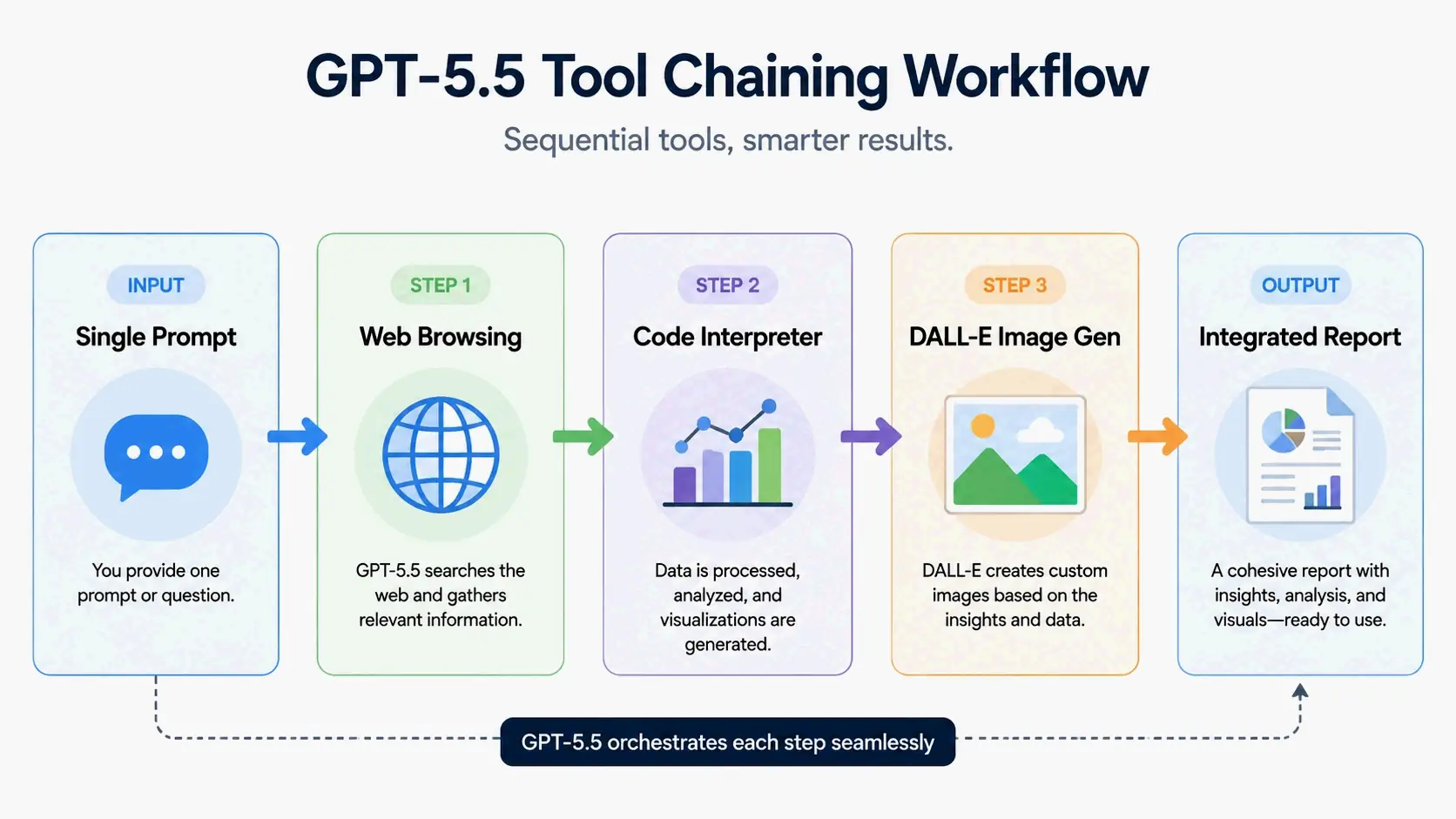
This template maps the workflow: research via web browsing, analyze with Code Interpreter, and create visual assets with DALL-E. You can adapt the structure for competitive analysis, market research, data-backed content creation, or any task that needs multiple AI capabilities running in sequence.
Additional writing prompts continue across email communication, learning and research, and productivity categories. The full library of 50 templates—including cold outreach emails, meeting follow-ups, study plans, weekly review frameworks, and habit planners—is available through the prompt collections published by SurePrompts in 2026.
How to Debug and Fix a Failing Prompt: A Step-by-Step Checklist
Even a well-structured prompt can sometimes spit out disappointing results. Instead of scrapping it or starting from scratch, you can diagnose and fix the problem systematically. The goal is to shift from just copying prompts to actually engineering them—understanding why something works and tweaking it when it doesn’t.
Step 1: Diagnose with Specificity
When output feels vague or misses the mark, the culprit is usually a lack of specificity. Look at the prompt and ask: did I say who the AI should be, who the output is for, and what the concrete goal is? If any of those are missing, the AI defaults to generic. The fix: add a role (“You are a [specific professional]”), audience context (“The reader is [specific audience]”), and a clear goal statement.
Step 2: Inject Context and Constraint
Generic output often comes from missing boundaries. The AI can’t guess your preferred word count, tone, or formatting. Add explicit constraints: a max word count, a tone descriptor, and an output format spec. “Keep it under 150 words” or “Present the results as a markdown table” gives the model guardrails that improve the output dramatically.
Step 3: Define the Output Format
If the information is right but the structure is a mess, the format instruction needs tweaking. Spell out exactly what the output should look like—a table with specific columns, a numbered list with one action per step, or a paragraph with a bold topic sentence followed by supporting details. Format is the easiest thing to fix, and small adjustments often turn unusable text into something ready to paste.
Step 4: Test with an Iterative Refinement Loop
When a prompt gets you 80% of the way there, don’t rewrite the whole thing. Follow up with a targeted correction: “Make the tone more casual,” “Cut this to half the length,” or “Add a specific example for the third point.” Iterative refinement keeps what worked while fixing what didn’t. It’s faster and produces more consistent results than starting over.
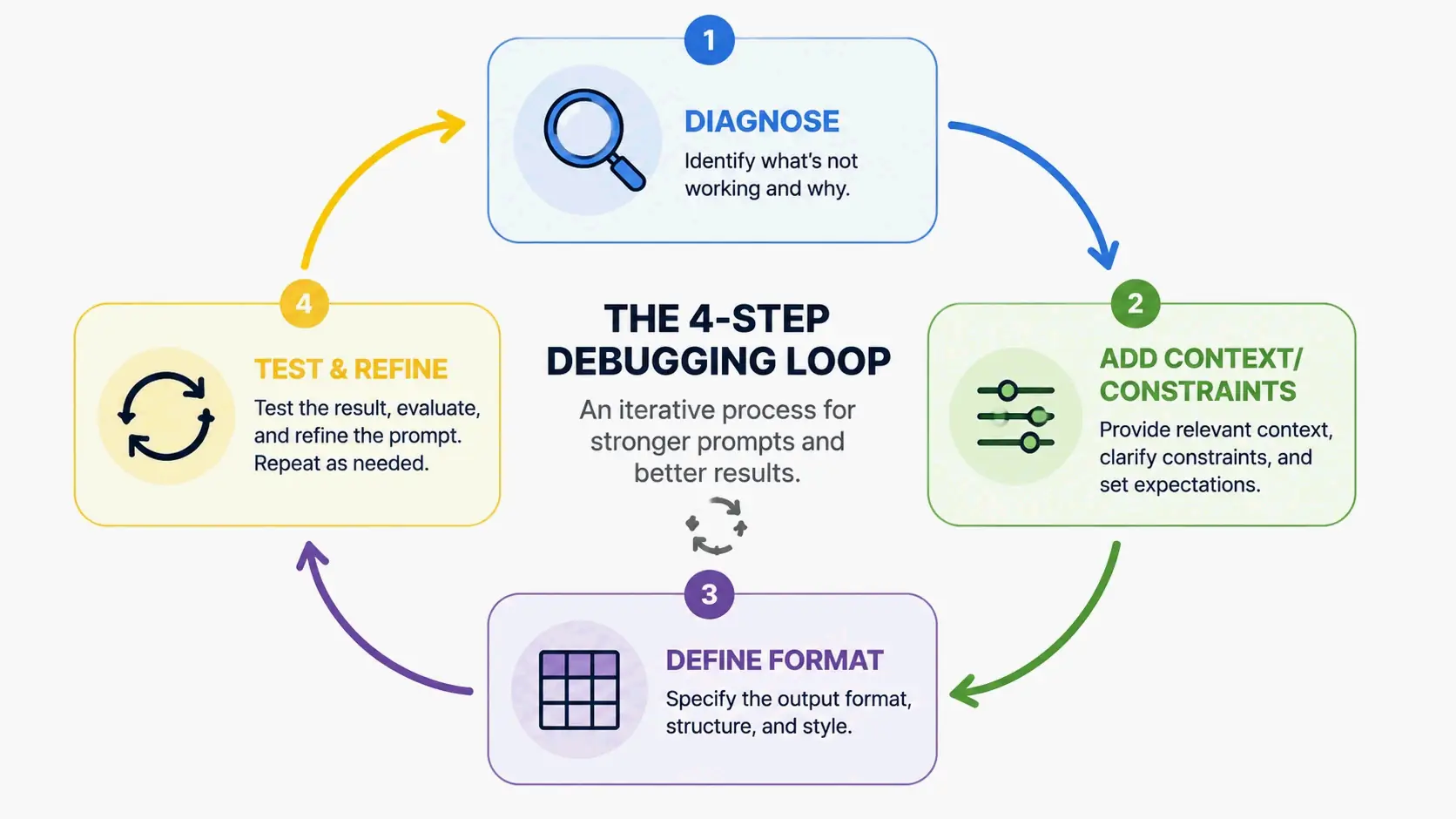
Here’s what the process looks like in practice: a failing prompt like “Write me a marketing email” runs through the checklist. Step 1 finds the missing specificity—no audience, no goal, no role. Step 2 adds context: the product, target customer, and key benefit. Step 3 defines the output format: subject line separate from body, under 120 words, no filler opener. Step 4 refines: the first draft is close but the tone is off, so the follow-up says “more direct, less formal.” The result is a usable email that needs minimal editing.
Real-World ROI: How a Small Business Turned a Downturn Around with AI Prompts
The Baguio Transient House case study, published in 2026 on baguiotransient.net, shows how structured AI prompts can drive measurable business results—not just theoretical efficiency.
Oliver, the host of Valencia VOS Baguio Transient House, watched tourism drop and monthly sales slide in early 2026. He’d been running the business since 2020, hosting over 10,000 guests, and was facing an existential problem. In March 2026, he bought a $20 AI subscription (Claude) and rebuilt his entire approach around prompt engineering.
The transformation leaned on several AI applications working together. He rebuilt his website on Next.js with proper SEO structure. He set up a 24/7 AI chatbot that answers guest messages in English, Tagalog, and Taglish within seconds. He put clean conversion tracking in place and optimized content for the exact search terms travelers use—“near SM,” “near Session,” “near Burnham.”
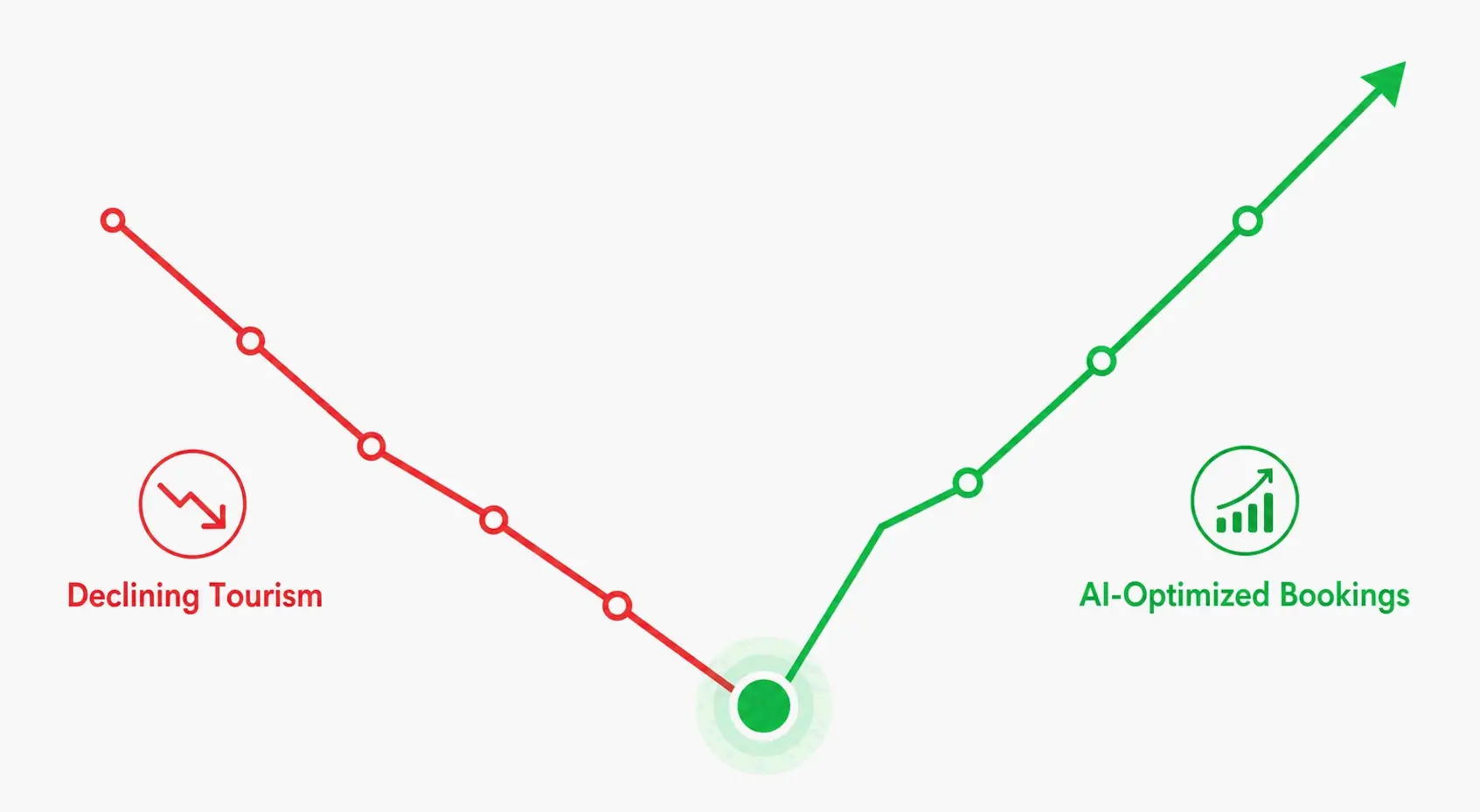
The results came quick: within weeks, the business ranked #1 for those key local searches and hit three consecutive weeks of fully-booked nights—while broader tourism stayed soft. A prompt-driven approach turned a declining business into one that was fully booked.
As Oliver, Host, puts it: “The skill is using [AI] to shortlist fast, then verifying the final pick yourself.” That principle—using AI as a powerful research and execution tool while keeping human verification in the loop—ties directly back to the business prompt templates above. The SWOT analysis, competitive intelligence, and pricing strategy prompts all follow the same rhythm: let AI do the heavy analytical lifting, then apply human judgment to the output.
Trust but Verify: The Golden Rules for Editing Any AI Output
No matter how well you prompt, AI-generated content needs a review before you use it—especially in business, legal, or financial work where mistakes have real consequences. ChatGPT can confidently spit out outdated prices, made-up statistics, or plausible-sounding but wrong facts. Knowing this limitation and building verification into your workflow separates AI-assisted pros from people who get burned by hallucinations.
Oliver frames it well: “AI is a research assistant, not an oracle.” That’s the right relationship: AI speeds up research and drafting, but you stay responsible for accuracy.
Here’s a three-step verification checklist to run on every piece of AI-generated output before it goes anywhere professional.
Check Facts. Verify any specific claims, numbers, dates, or names the AI produced. If it says a competitor charges $X, confirm that independently. If it references a regulation or legal requirement, look up the source. ChatGPT can fabricate metrics that sound reasonable but have no basis in reality—delete any figure you didn’t provide yourself.
Check Sources. When ChatGPT cites studies, quotes, or data points, trace them back to the origin. The model can mix up attribution, invent references that sound plausible, or present old info as current. For anything critical, find the original source instead of trusting the AI’s summary.
Check Logic. Even when individual facts hold up, the AI’s reasoning or recommendations might contain gaps. Walk through the argument: does the conclusion follow from the evidence? Are there alternative explanations the AI missed? Does the recommendation account for your specific constraints?
Common hallucinations include citing last year’s pricing as current, inventing customer testimonials that don’t exist, and presenting market statistics with no verifiable source. When the output matters—client-facing docs, financial analysis, legal language—verification isn’t optional. It’s the final step that turns a fast AI draft into something you can trust.
Conclusion
A great copy and paste ChatGPT prompt isn’t just a shortcut—it’s a systematic way to turn AI into a reliable professional tool. Moving from loose questions to engineered templates that specify role, context, and output format gets you better results instantly. The 50+ templates here are starting points, but the principles behind them apply to any task. Start with the business templates in Section 2: replace the placeholders, paste them into GPT-5.5, run the output through the verification checklist, and iterate on what comes back. The gap between mediocre and exceptional AI output almost always comes down to a few specific details.
FAQ
Do I need a ChatGPT Plus subscription to use these copy-paste prompts?
Many prompts, especially basic text tasks, work fine on the free tier. Prompts that need DALL-E for image generation, Code Interpreter for data analysis, or web browsing are exclusive to ChatGPT Plus. Only upgrade if your main tasks fall into those Plus-only features.
How do I copy the AI’s response to Word or Notion without losing its formatting?
Tell ChatGPT to format the output in Markdown or plain text—that pastes cleanly across apps. For richer reports, ask it to provide the output inside an HTML code block that you can save as a .html file. For simple tasks, just use the copy response button in the ChatGPT interface.
Can I use these prompts with Claude or Gemini instead of ChatGPT?
Yes, the core ideas—specificity, role assignment, placeholders—work across all major language models. But advanced features like tool-chaining with Code Interpreter and DALL-E are unique to ChatGPT’s ecosystem. For cross-platform text tasks, strip out ChatGPT-specific feature requests.
What should I do if a prompt gives me a bad or inaccurate result?
First, go through the debugging checklist in Section 3 to spot structural problems with the prompt. Then apply the verification rules from Section 5, since the AI might be hallucinating facts or sources. Treat the first response as a draft and refine iteratively: add more context, say what to avoid, or break the task into smaller steps.
How can I be sure the business advice from these prompts is reliable?
Think of ChatGPT as a strategic brainstorming partner, not a licensed professional. Its advice is synthesized from training data, not real-time certified expertise. Always validate key financial figures, legal clauses, and market data against trusted external sources. For decisions with serious consequences, consult a qualified human expert.
