


You find keywords by breaking your topic into core concepts and expanding each with synonyms. SEO tools like Keyword Tool pull long‑tail phrases from Google Autocomplete and validate them by volume and difficulty. For academic work, you build a synonym matrix; now, you also map the entities that define your topic for AI search.
Contents
- The Universal Framework for Finding Keywords Across Any Field
- How to Find Keywords with SEO Tools: A Scenario-Based Approach
- Going Deeper: Validating Keywords Through Search Intent & Serp Features
- A Specialized Guide: How to Find Keywords for Academic Research
- The 2025 Shift: Find Keywords for AI-Powered Search Engines (GEO)
- Conclusion
- FAQ
The Universal Framework for Finding Keywords Across Any Field
There’s a systematic way to find keywords, no matter if you’re aiming for Google rankings, spotting content gaps, or doing a literature review. It starts with one idea: all keyword research follows the same logic. You pull out the critical concepts from your topic, then figure out the actual words real people type into search. That same method underpins SEO tools, academic database queries, and AI‑search optimization.
Step 1: Deconstruct Your Topic into Core Concepts
Start by writing out your topic or thesis statement, then underline the key nouns. For example, the question “What is the impact of college binge‑drinking on school performance?” immediately gives you three conceptual pillars: college, binge‑drinking, and school performance — exactly as librarian guides suggest (University of Connecticut). Strip out pronouns and filler words; the nouns do the heavy lifting. If your topic is “best ways to find keywords for SEO content,” the core concepts boil down to find keywords, SEO, and content.
This step works the same way for academic, business, and marketing contexts. In a business scenario, a question like “how does social media affect consumer trust in financial services” would be reduced to the nouns social media, consumer trust, and financial services (Montana State University Library).
Even a simple description like “I need to find keywords for my new photography blog” can be broken down into find keywords and photography blog. The goal isn’t to walk away with a keyword list yet — just to isolate the irreducible concepts.
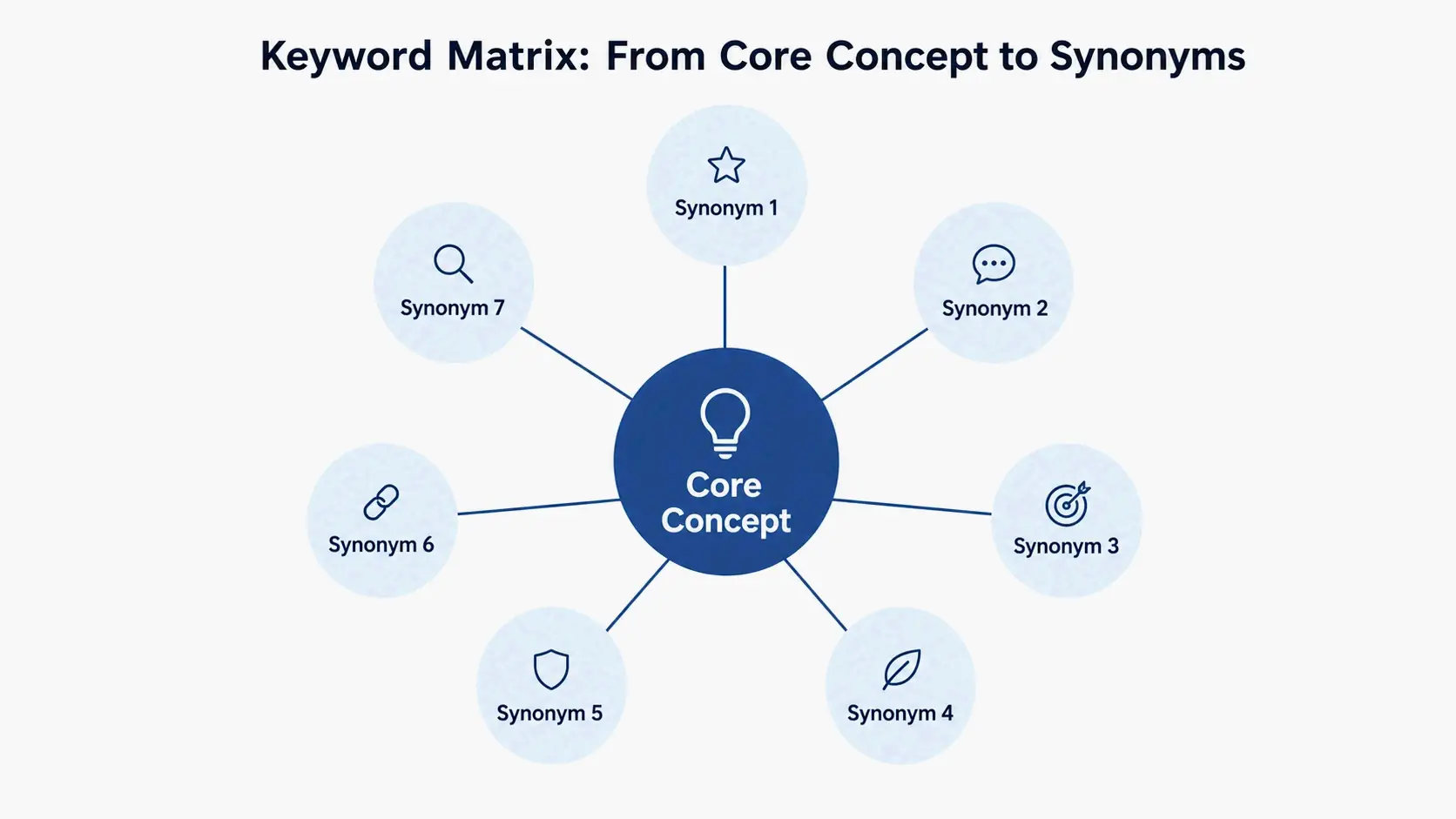
Step 2: Expand Each Concept into a Matrix of Terms
Take each core concept and build a set of related terms around it — synonyms, narrower terms, broader terms. This cluster is your keyword matrix. A matrix keeps you from getting tunnel vision and dramatically expands the number of useful search queries you can try.
For the concept college, your matrix might include: university, higher education, undergraduate, student. For binge‑drinking: alcohol abuse, heavy drinking, alcohol consumption. For school performance: grades, academic achievement, student success, GPA (UConn). Academic guides consistently recommend capturing singular and plural forms, spelling variations (pediatric vs. paediatric), acronyms (MRI vs. magnetic resonance imaging), and related terms from different disciplines (Texas Medical Center Library).
The same exercise applied to our SEO example yields:
– find keywords → keyword research, keyword discovery, identify search terms
– SEO → search engine optimization, organic search, Google ranking
– content → content creation, blog posts, content marketing
This two‑step framework — break down, then expand — is the foundation of everything that follows. It’s what separates mindless keyword matching from truly understanding concepts, and that matters more than ever as search engines get better at recognizing meaning, not just strings of words.
How to Find Keywords with SEO Tools: A Scenario-Based Approach
A framework is useful, but you still need the right tool to actually execute. Instead of listing tools in the abstract, let’s map common tasks directly to specific approaches and metrics.
Scenario A: I Need New Content Ideas (Tool: Keyword Tool)
When you need a lot of keyword ideas fast, a tool that taps into Google Autocomplete will give you the longest tail of suggestions. Keyword Tool does this by adding letters and numbers before and after your seed term, pulling hundreds of autocomplete predictions from Google into a clean list. The free version serves up 750+ long‑tail keyword suggestions per search term — no account needed — which is why so many pros use it every day.
The source is the real advantage. Google Autocomplete predictions are based on searches people have already done, factoring in language, location, and trending interest. Google Keyword Planner, by contrast, is built for advertisers and often hides profitable long‑tail phrases (Keyword Tool). Keyword Tool shows you the exact phrases people are typing. That’s why it’s so strong for content ideation. Plug in a seed like “home workout” and you get prompts like “home workout for beginners,” “home workout no equipment,” and “home workout for weight loss” — each one a ready‑made blog post title, video topic, or content cluster.
Scenario B: I Want to Steal Competitor Traffic (Technique: Gap Analysis & On-Page Audits)
The fastest way to find keywords your competitors rank for (but you don’t) is a keyword gap analysis — available in tools like Semrush that pull a domain’s organic keyword set. But even if you’re not paying for a premium suite, manually auditing competitor pages can reliably reveal what they’re targeting.
Look at the on‑page elements that carry the strongest SEO signals. As web‑creation guides point out, the page title tag almost always holds the primary keyword; the H1 reinforces it, while H2 and H3 subheadings often target secondary or related keywords (Elementor). The URL itself is a clear signal — a well‑optimized one includes the main keyword (like example.com/blog/how‑to‑find‑keywords). Image alt text, meta descriptions, and the opening paragraphs regularly contain target phrases too.
Audit these on‑page SEO elements across a few competitor pages and you’ll piece together a reliable keyword map. If your budget allows, pair this with a gap analysis tool to get a list of proven, high‑intent terms your own content might be missing.
Scenario C: I Need to Know if a Keyword Is Worth My Time (Metrics: Search Volume & Difficulty)
Finding a keyword doesn’t mean much unless you know whether people actually search for it and whether you have a shot at ranking. Two metrics answer that.
Search Volume (average monthly searches) is an estimate of how many times a keyword gets queried each month. It helps you prioritize: a term with 10,000 searches generally deserves more effort than one with 30 — provided it matches what your audience wants. Keyword Tool Pro pulls search volume data straight from advertising platforms for 190+ countries and 68,000+ locations, so you can validate with precision.
Keyword Difficulty estimates how hard it is to appear on the first page of Google for that keyword. Not every tool surfaces this metric in its free tier, but services like KWFinder display a difficulty score alongside suggestions about why the existing results may be vulnerable (e.g., outdated content, missing keywords in titles) (Zapier). A keyword with moderate volume and low difficulty often represents the highest‑efficiency target, especially for newer sites.
Going Deeper: Validating Keywords Through Search Intent & Serp Features
A list of keywords is only a hypothesis. Validation means understanding what someone actually wants when they type a query — and checking whether Google’s results agree.
Decoding the Search Intent Behind Your Keywords
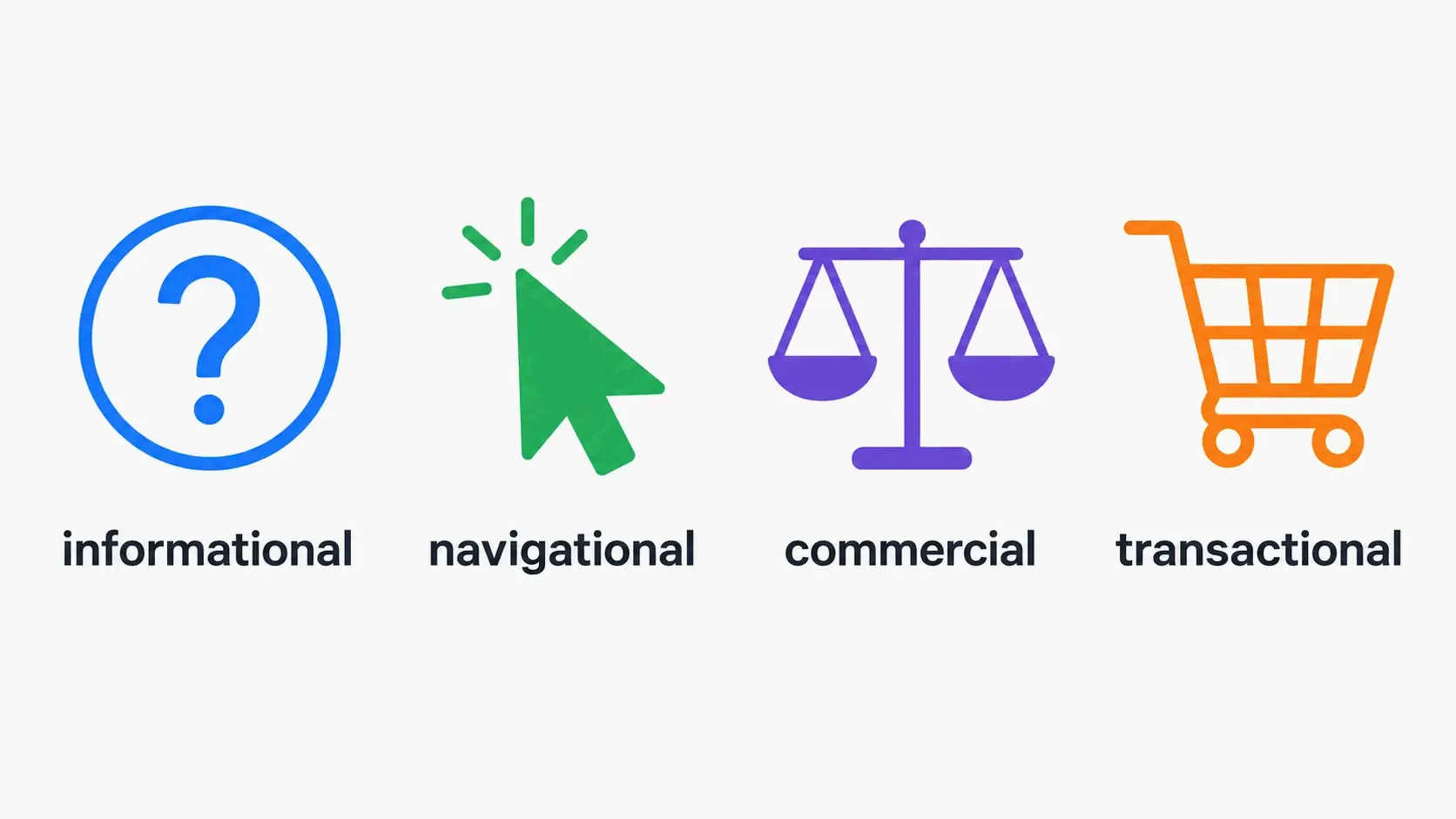
Search queries usually fall into four buckets: informational (looking for knowledge, like “how to find keywords”), navigational (finding a specific site, like “Keyword Tool login”), commercial (researching before buying, like “best keyword research tools”), and transactional (ready to act, like “buy Keyword Tool Pro”) (Elementor). A keyword’s wording often tips you off. “How to” or “what is” queries are almost always informational; “best,” “top,” or “vs” lean commercial.
Matching your content type to the intent is the single most important optimization step. A keyword with transactional intent demands a product page; commercial keywords call for comparison posts or buyer’s guides; informational keywords need tutorials or in‑depth articles. Ignoring this match wastes both traffic and ranking potential.
Using Serp Features as a Reality Check for Intent
The search engine results page itself validates intent assumptions. Look at what Google shows for your target keyword besides the ten blue links. If the result includes a Featured Snippet that directly answers a question, the dominant intent is informational and the search engine rewards concise, authoritative definitions. A results page filled with product carousels and shopping ads indicates strong transactional intent.
Platforms like Semrush and AnswerThePublic surface these SERP features alongside keyword data. The presence of an AI Overview, video pack, or “People Also Ask” box tells you exactly which content formats Google considers most relevant for that query (Zapier). Aligning your output with those features — for instance, creating a video when a video carousel dominates — gives you an immediate advantage.
A Specialized Guide: How to Find Keywords for Academic Research
Academic databases operate on a different logic than web search. They prioritize precision and recall across millions of structured records, which means the keyword matrix from Section 1 becomes even more critical. Every concept needs a full set of synonyms and related terms, because a single missed synonym can hide dozens of relevant studies (University of Connecticut).
Building a Powerful Search String with Boolean Operators
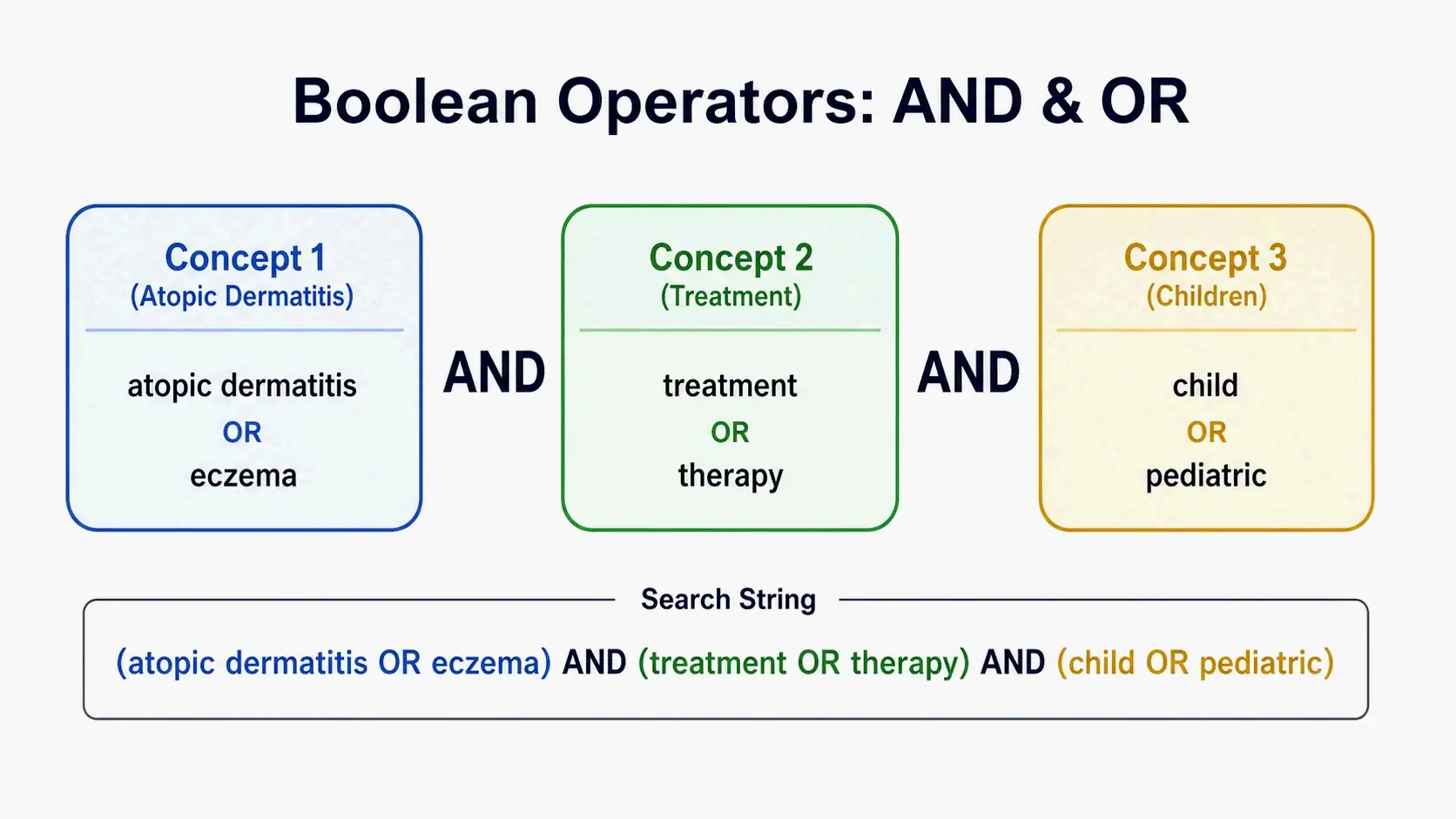
Boolean operators — AND, OR, NOT — let you combine concepts and synonyms into a single, powerful search string. Use OR inside parentheses to group synonyms for one concept, and AND to link different concepts together. For a topic on the impact of social media on consumer privacy, the final search might be: ("social media" OR "social network") AND (privacy OR "personal privacy") AND (concern OR worry) (Montana State University Library).
Without this syntax, any database simply looks for your exact string; with it, you instantly retrieve articles that use any combination of your carefully chosen terms. Always place multi‑word phrases in quotation marks and capitalize the operators to ensure the system interprets them correctly.
Beyond Keywords: Controlled Vocabularies in Professional Databases
In specialized fields like medicine, databases such as PubMed tag articles with subject headings from a controlled vocabulary — MeSH (Medical Subject Headings), for example. Each MeSH term has a page listing Entry Terms: synonyms and alternate labels that aren’t automatically searched when you use the heading, but you should add them to your keyword list. For “Heart Diseases,” the MeSH Entry Terms include “cardiac disease” and “heart diseases” (Texas Medical Center Library). Adding these makes sure you cover the terms researchers actually use, even if they don’t match the official heading.
The 2025 Shift: Find Keywords for AI-Powered Search Engines (GEO)
By 2026, a plain list of keywords isn’t enough anymore. AI‑powered search engines like Perplexity don’t just return links; they synthesize answers from multiple sources. To be visible in that environment, you need to focus on the core entities — the people, concepts, tools, and frameworks — that any thorough answer must mention. Finding keywords for AI search means first identifying those entities, then building content that’s the go‑to source on each.
From Keywords to Entities: The Core of AI Search
An entity is a real‑world subject that a search engine recognizes as a distinct concept. For the field of keyword research, key entities include “Keyword Research Tools,” “Google Autocomplete,” “Search Volume,” and “Search Intent.” When an AI engine constructs an answer about how to find keywords, it looks for credible content that thoroughly explains these entities and their relationships. Mapping your keyword list to a set of such entities — and then structuring your pages around them — is the fundamental shift from traditional SEO to Generative Engine Optimization (GEO).
As Matt Albrecht, a professional who uses Keyword Tool Pro daily, describes: “In a world with 1 billion SEO tools, Keyword Tool Pro is the only one that I absolutely use every day. Honing in on the perfect wording when targeting the biggest keywords in entertainment is as essential to my job as my coffee mug.” That obsession with precise terminology reflects exactly what entity‑driven content requires: authoritative clarity around the concepts that matter most.
Tools and Tactics for Entity-Driven Keyword Strategy
Modern keyword research platforms now support data collection for AI search environments. Keyword Tool includes Perplexity as one of its supported search platforms, allowing you to extract autocomplete suggestions from an AI‑oriented engine in addition to Google, YouTube, and others. With Keyword Tool Pro, you can generate keywords from platforms like Perplexity and layer on search volume data from 190+ countries and 68,000+ locations, then export the results for integration into AI workflows.
Once you have your candidate keywords and entities, put them to work on your pages. Use the primary entity in your title tag and H1, and feature related entities in H2 and H3 subheadings. Implement Schema Markup (such as Article or FAQ schema) to explicitly tag those entities for machine understanding. The combination of entity‑oriented research and structured on‑page signals creates the kind of single, trusted source that AI search engines prioritize when assembling answers.
Conclusion
The real key to finding the right keywords — in any field, on any platform — is to treat it as understanding concepts, not just matching words. The universal framework (break down your topic, then expand each concept into a term matrix) works whether you’re mining Google Autocomplete with Keyword Tool, writing a Boolean search for PubMed, or building entity‑rich content for AI search engines. Next time you research, start by isolating your topic’s core entities. Then use the scenario guide here to pick the right tool and metrics, validate intent through SERP features, and build content that truly matches what your audience is looking for.
FAQ
Can I use AI chatbots like ChatGPT for keyword research?
Chatbots can brainstorm related terms and generate broad topics, but they don’t draw on real‑time search data. Always validate search volume, keyword difficulty, and intent through a dedicated tool like Keyword Tool. The best use of a chatbot is building the initial keyword matrix from Section 1 before moving to data‑driven validation.
What’s the difference between finding keywords for SEO and for academic research?
SEO focuses on the actual words people type into public search engines, measured by audience demand and competitive metrics. Academic research targets concepts, synonyms, and controlled vocabularies (like MeSH) queried in structured databases with Boolean operators. The concept‑deconstruction logic is identical; the tools and validation metrics differ.
Is Google Keyword Planner free, and is it good for finding SEO keywords?
Google Keyword Planner is free but built for paid‑search advertisers. It provides accurate search volume and bid data, yet its keyword suggestions are often broadly related and leave out the long‑tail informational queries that drive organic content. Tools like Keyword Tool, which use Google Autocomplete as a primary source, surface more specific, content‑ready ideas.
