


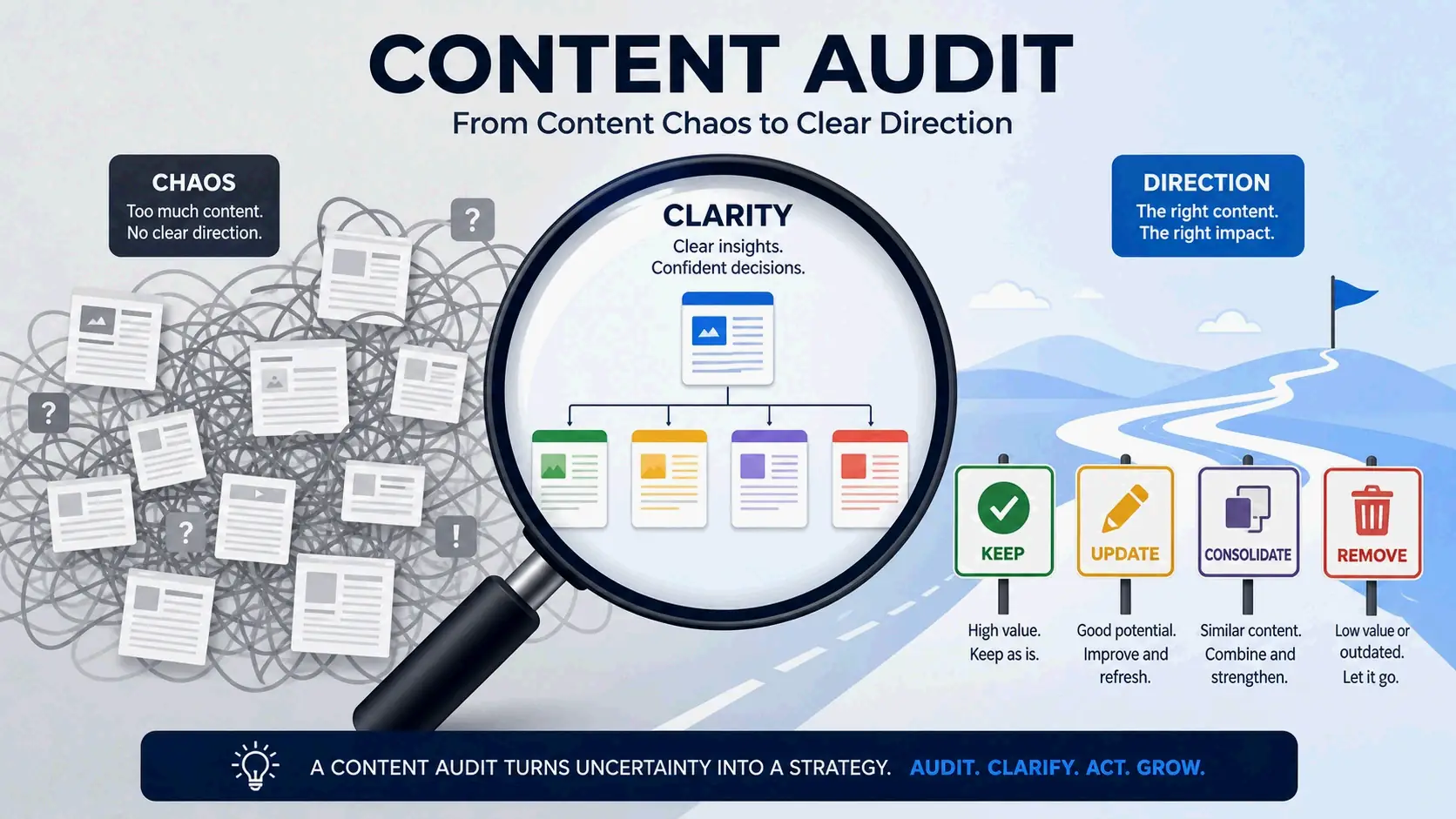
Learning how to perform a content audit means systematically evaluating every page on your site against performance data and quality criteria. You inventory all URLs, pull traffic and engagement metrics, score each piece against business goals, then assign one of four actions: keep, update, consolidate, or remove.
Contents
What Is a Content Audit? (And Why 96.55% of Pages Need One)
A content audit combines an exhaustive quantitative inventory with a rigorous qualitative evaluation. The inventory answers “What is there?” by logging every published asset on your website. The audit then answers the follow-up: “Is it any good?” That distinction matters. An inventory on its own just gives you a list; an audit gives you a decision framework you can actually use to shape your content strategy.
Wikipedia describes a content audit as “an accounting of all currently published web content” and a “cornerstone of content strategy.” It’s a qualitative analysis of your information assets — assessing each piece and how it relates to other pages on your site.
A content audit is not an SEO audit, and mixing the two leads to incomplete work. An SEO audit checks technical health — crawlability, site speed, backlinks, indexation — asking whether search engines can find and access your pages. A content audit asks whether those pages are worth finding at all. The technical audit ensures visibility; the content audit ensures value.
But why does this distinction matter so much right now? A study by Ahrefs that analyzed over 14 billion pages found that 96.55% of pages get zero organic traffic from Google (2024). Most published content never gets found. On top of that, a SparkToro study found that fewer than one in three Google searches now send a click to the open web (2026). AI Overviews and zero-click results are absorbing traffic that used to go to individual pages. That makes content quality and relevance more critical than they’ve been in the past decade.
These numbers make a content audit an essential diagnostic tool, not an optional cleanup. A site with 80 blog posts — 20 high-quality and 60 thin, outdated, or duplicative — will perform worse in search than a site with 30 consistently strong, well-maintained articles. The audit identifies which bucket each page belongs to and gives you the evidence to act.
Your audit in 2026 also needs to address AI and LLM citation readiness. With fewer users clicking through to websites, getting cited by generative AI engines — ChatGPT, Perplexity, Google AI Overviews — has become its own traffic channel. You need to check whether your content is structured and authoritative enough for these systems to pull from and cite.
The 5-Step Process for How to Perform a Content Audit
A systematic content audit follows a clear sequence: inventory every URL, attach performance data from multiple sources, score each page against consistent criteria, resolve conflicts like keyword cannibalization, and build a prioritized execution roadmap. Skipping steps or evaluating content without a scoring framework leads to inconsistent decisions and wasted effort. The process turns a chaotic spreadsheet into a prioritized action plan.
The core tools you’ll need: Google Search Console for organic search performance data, Google Analytics 4 for engagement and conversion metrics, and Screaming Frog SEO Spider for building the complete URL inventory. For sites under 50 pages, a manual CMS export can work — but using a crawler ensures no orphaned or forgotten pages slip through.
Step 1: Create a Complete Content Inventory
Start with a complete list of every indexable page on your site. If you miss a URL, that page escapes the audit entirely. It’s common for sites to carry orphaned pages, old test content, and forgotten campaign landing pages that still appear in search and consume crawl budget.
Screaming Frog SEO Spider is the standard tool for this. Configure it to crawl your domain, filter for HTML only, and export the full URL list. The export automatically captures page title, H1, meta description, word count, and status code for every URL.
For sites with fewer than 50 pages, you can export from your CMS sitemap manually. The risk? Pages that are accidentally indexed but not in the sitemap — staging content, old campaign pages, or blog posts published outside the usual category structure. Cross-reference your sitemap export against Google Search Console’s Indexing report to catch these outliers.
After exporting, add key metadata columns to your spreadsheet: page title, H1 heading, publish date, last modified date, content type (blog post, landing page, product page, case study), and primary target keyword. This turns raw crawl data into a working content inventory. No evaluation yet — you’re just building a complete, accurate list of everything that exists.
Step 2: Pull Performance Data from Google Search Console and GA4
Performance data turns your inventory from a list of URLs into an evidence-based decision framework. Without it, every content decision is a guess. Two data sources give you the full picture: Google Search Console for search visibility and Google Analytics 4 for on-site behavior and conversions.
From Google Search Console, export the last 12 to 16 months of data at the page level. Include total clicks, impressions, average position, and click-through rate (CTR) for each URL. A longer timeframe matters because shorter windows can be misleading. A December dip for an ecommerce guide might look alarming over three months but totally normal across a full year. The 12–16 month range also helps you tell real ranking declines from temporary blips that correct on their own.
From Google Analytics 4, go to Reports > Engagement > Pages and Screens and export sessions, average engagement time, engagement rate, and any key event counts tied to conversion goals. This data answers a critical question search metrics alone can’t: is the arriving traffic actually doing anything useful? A page that drives 5,000 monthly sessions but converts no one might be less valuable than a page driving 50 sessions that generates two qualified leads.
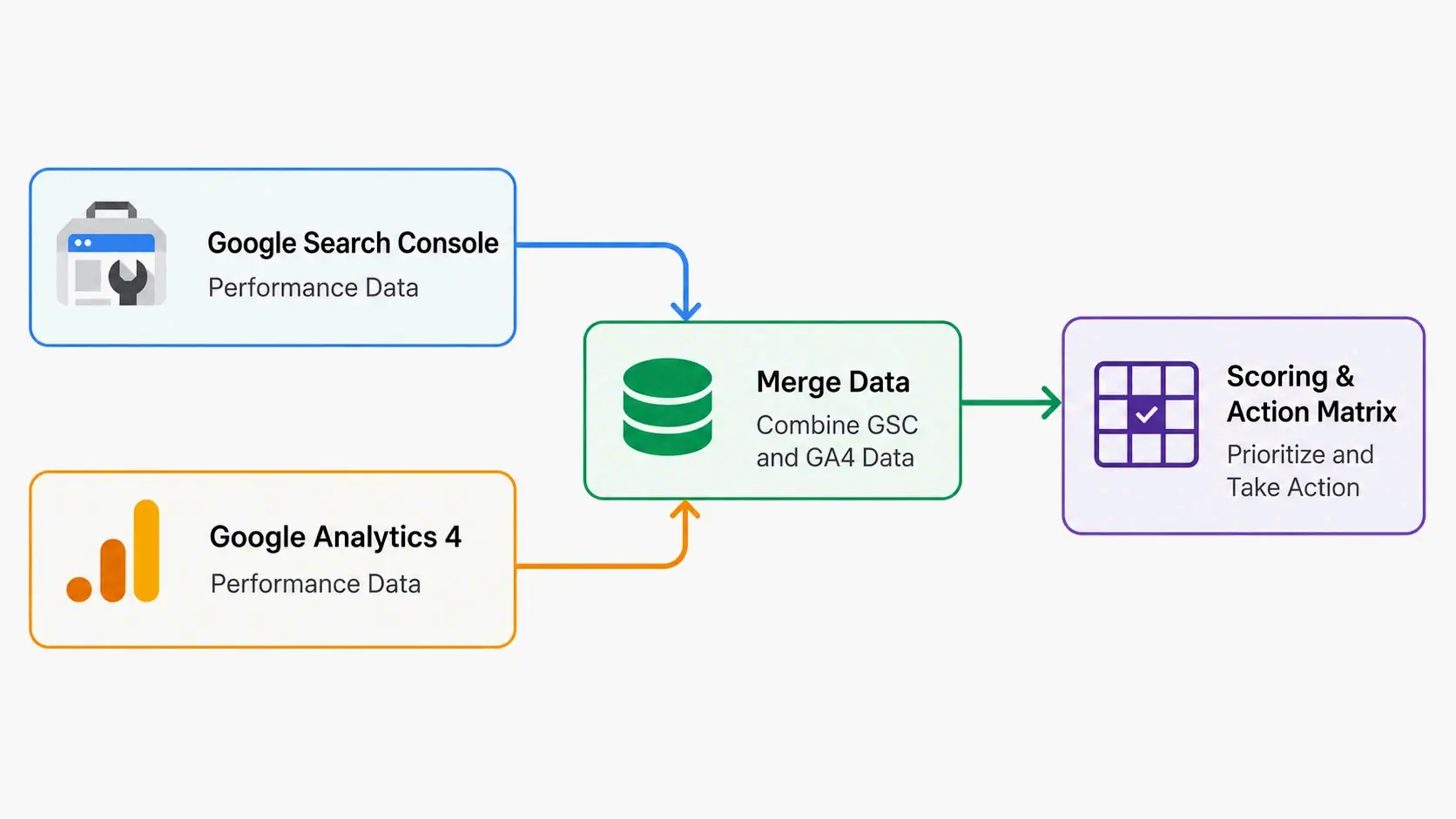
Once both exports are ready, use VLOOKUP or INDEX/MATCH in Google Sheets to merge the GSC and GA4 data into your inventory spreadsheet by URL. The combined view shows which pages have visibility but no engagement, which have engagement but no conversions, and which underperform across every dimension. This is what you’ll feed into the scoring step.
Step 3: Score Every Page with a Content Scoring Matrix
Here’s where most audits go wrong: they leave you with a spreadsheet full of numbers and no clear way to translate those numbers into decisions. Gut decisions lead to inconsistent results. The Content Scoring Matrix eliminates the guesswork by evaluating every page on two standardized axes: Business Value and Search Performance.
Business Value measures how closely a page aligns with your commercial goals. Score each page from 1 to 3:
– 1 = minimal value. The page serves no clear business purpose or attracts the wrong audience.
– 2 = moderate value. It supports broader content goals but doesn’t directly influence revenue.
– 3 = high value. The page directly maps to your Ideal Customer Profile, generates conversions, or has clear brand significance.
Search Performance measures organic visibility and trajectory:
– 1 = negligible organic traffic and no meaningful keyword rankings.
– 2 = moderate traffic or rankings in positions 11–30, where there’s discoverability but limited click-through.
– 3 = strong performance: consistent organic traffic and first-page rankings for commercially relevant keywords.
Plot those two scores on a 2×2 grid, and the actions become clear:
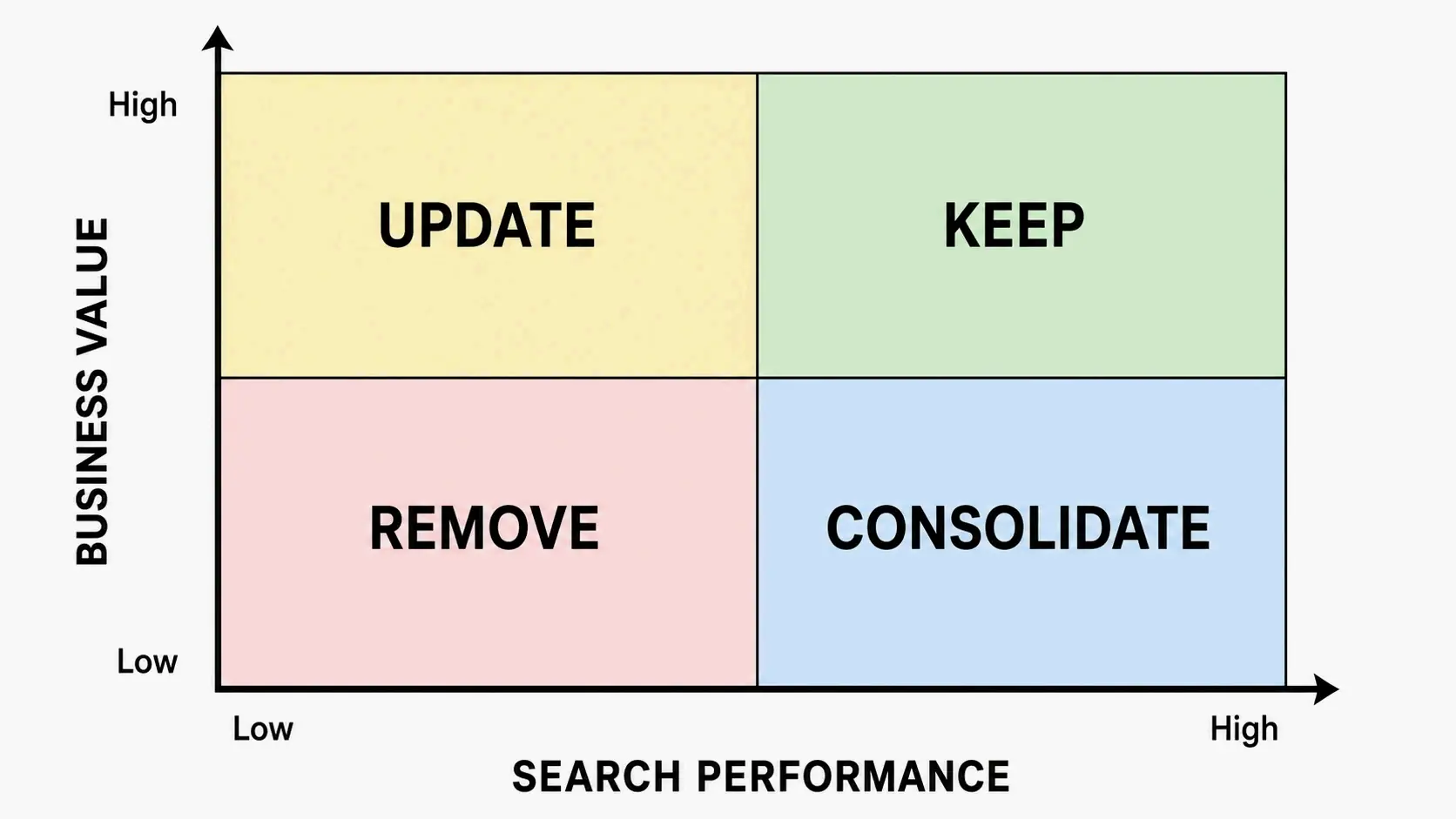
- High Business Value + High Search Performance → Keep. Maintain actively, refresh quarterly, and make sure internal links point here from new content.
- High Business Value + Low Search Performance → Update. The topic is valuable, but the execution needs rewriting, expansion, or realignment with current search intent.
- Low Business Value + High Search Performance → Consolidate. The page attracts traffic that isn’t commercially useful, or it competes with high-value pages for the same keywords. Redirect this traffic to a more relevant page.
- Low Business Value + Low Search Performance → Remove. Delete and 301-redirect to the nearest relevant page, recovering crawl budget and eliminating content that dilutes your site’s quality signals.
A qualitative E-E-A-T check acts as an override for critical content. For pages covering Your Money or Your Life topics — finance, health, legal, major purchasing decisions — a failing E-E-A-T score automatically demotes a Keep to an Update, even if traffic looks good. As Kimberly Wise, Content Editor at Ignite Visibility, puts it: “Instead of asking, ‘Does this page rank?’ I ask, ‘Would I trust this page if I landed on it today?’” That mindset surfaces issues that traffic metrics alone will miss.
A quick example makes the framework usable right away. Picture a blog post from 2023 about a product feature that no longer exists. The post ranks on page two for a relevant keyword (Search Performance: 2) and used to get decent traffic, but the topic has high commercial relevance (Business Value: 3). The combined score says Update: the page needs a full rewrite reflecting the current product, not removal. If that same post had zero traffic (Search Performance: 1) and discussed a feature from a discontinued product line (Business Value: 1), the map points clearly to Remove.
This framework also helps you spot Content ROT — Redundant, Outdated, Trivial content. Pages that are factually wrong, duplicated elsewhere on the site, or too thin to serve anyone become immediate Remove or Consolidate candidates, no matter what their scores say.
Step 4: Identify and Fix Keyword Cannibalization
Keyword cannibalization happens when multiple pages on your site target the same keywords, splitting ranking authority across competing URLs instead of concentrating it on one authoritative page. If you’ve been publishing for years without a structured content strategy, this is one of the most common and costly SEO problems an audit can uncover.
The detection method is straightforward with Google Search Console. Pivot your export by query and look for any search terms where multiple URLs from your domain get impressions. A financial services site, for example, might find that three different blog posts, a service page, and a case study all rank for “small business loan Singapore” — but none cracks page one because authority is fragmented across five URLs.
Cross-reference these findings with Ahrefs or Semrush to see historical ranking fluctuations for the competing URLs. Often you’ll see pages trading places over time, each briefly appearing at similar positions before the cannibalization effect drags them all down. These tools also show which URL has the strongest backlink profile, giving you a clear candidate for the surviving page.
The fix follows a consistent sequence:
1. Choose the strongest URL based on backlink authority, content relevance, and existing conversion performance.
2. Rewrite that page to be comprehensive, covering every angle the competing pages addressed in isolation.
3. 301-redirect the weaker URLs to the strengthened survivor and update internal links sitewide to point to the consolidated page.
For commercial landing pages and blog posts targeting the same query, the direction of the redirect depends on search intent. If searchers are in buying mode, the product or service page usually survives. If they’re researching, a comprehensive guide may be more appropriate, with the commercial page linking to it prominently. The goal is one URL that presents the strongest possible answer for that query — not multiple weak pages competing against each other.
Step 5: Assign Actions and Build a Prioritized Execution Roadmap
An audit spreadsheet without an execution plan is organizational waste. This final step turns your Keep, Update, Consolidate, and Remove classifications into a sequenced, time-bound action plan your team can actually ship. An Effort vs. Impact Matrix gives you the prioritization framework.
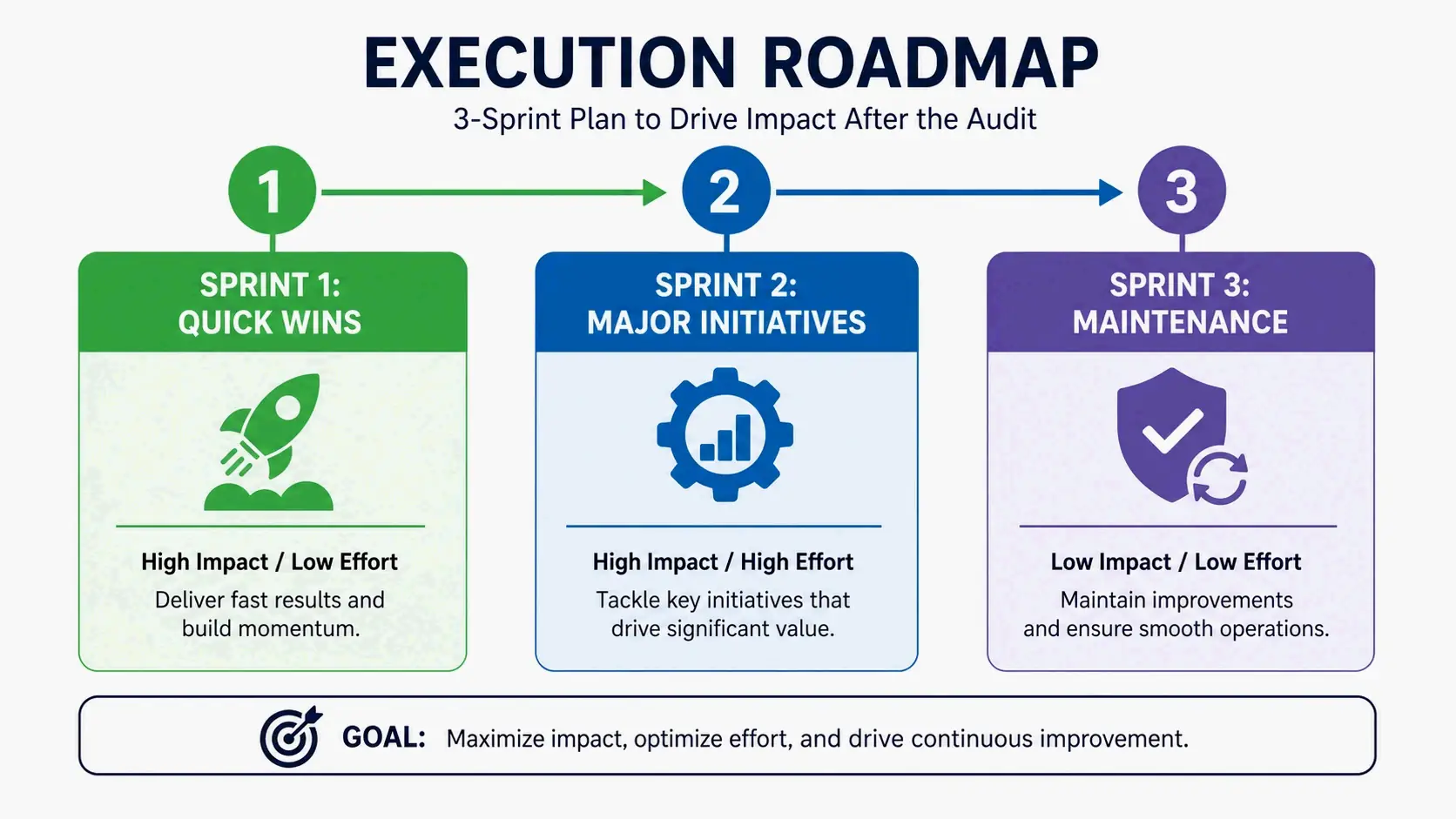
Sprint 1: High Impact, Low Effort Quick Wins
These include implementing 301 redirects for removed pages, consolidating cannibalized posts from Step 4, and refreshing pages ranking in positions 8 through 15. Pages on the cusp of page one already have enough authority; a refresh — updating statistics, strengthening the opening answer, aligning with current search intent — often pushes them onto the first page within weeks. Fixing broken internal links and adding missing meta descriptions also fall here.
Sprint 2: High Impact, High Effort Initiatives
This covers major rewrites of commercially valuable pages that have declined significantly, combining multiple thin posts on the same topic into a single definitive guide, and restructuring content that lacks the E-E-A-T signals required to compete. These projects take more time, but they directly improve the assets most likely to drive revenue.
Sprint 3: Low Impact, Low Effort Maintenance
Updating outdated statistics, replacing old screenshots, refreshing publication dates on evergreen content, fixing minor formatting issues. Individually, these tasks don’t transform performance, but they add up to a noticeably cleaner, more trustworthy content library.
The strongest argument against starting with new content creation comes from real results. TuxCare, a security solutions provider, partnered with an SEO agency after cycling through seven previous agencies over three years. Their blog had grown past 3,000 articles, but very little of that content drove meaningful business results. The audit surfaced cannibalization across entire topic clusters and identified hundreds of pages that had never generated traffic, rankings, or conversions. Before publishing a single new article, the team consolidated overlapping pages, redirected obsolete URLs, and removed low-value content. Organic traffic climbed roughly 40%. Only then did they begin publishing new content around commercial buying intent — and overall organic traffic grew 48% the next quarter, with blog traffic up 59%.
Another case reinforces the same pattern. Innoloft, a B2B SaaS platform, applied a Keep / Update / Merge / Kill framework after a full content audit. The result: a 60% increase in organic traffic over seven to eight months.
Once the initial audit cycle is complete, a rolling content audit maintains the gains. Instead of waiting a full year, schedule quarterly check-ins on the top 20% of pages by business value and monthly reviews of any pages showing sustained traffic declines in GSC. This catches decay before it becomes a traffic loss and prevents the content library from accumulating dead weight between full audits.
The 2026 Imperative: Score Your Content’s AI Citation Readiness
The biggest evolution of the content audit between 2023 and 2026 is the rise of AI-driven search. Google AI Overviews, ChatGPT, Perplexity, Claude, and Gemini now answer user questions directly, pulling information from the web without always sending a click back to the source. The SparkToro Zero-Click Search Study confirms that fewer than one in three Google searches still result in a click to the open web (2026). Traffic that used to flow to well-ranking pages is increasingly absorbed into the answer itself.
This shift means a page can sit at position one in traditional results and still never reach a user, because the AI-generated overview already answered the question before the user scrolled to the blue links. Earning visibility now requires being the source the AI chooses to cite — and that demands a different set of content qualities than traditional ranking optimization.
AI engines reward content that’s authoritative, clearly structured, and easy to extract information from. When an LLM answers a user query, it pulls self-contained passages that directly address the intent, favoring sources that state definitive answers early and back them up with verifiable evidence.
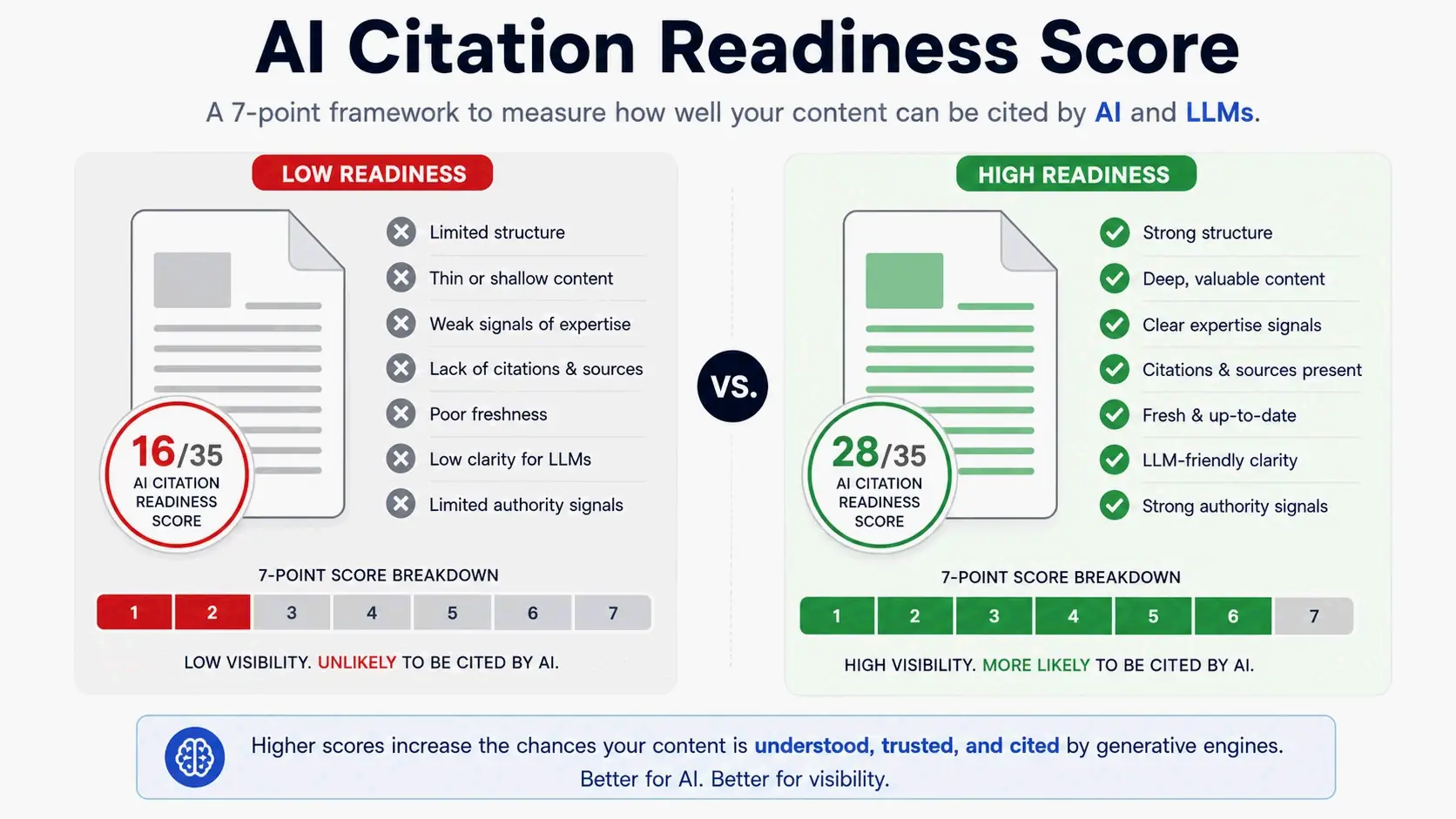
The actionable 7-point AI Citation Readiness Score evaluates any page against the criteria that determine citability. For each factor, score from 1 to 5, where 1 means the page fails entirely and 5 means it’s fully optimized.
- Direct answer in the first 100 words. Does the page state its core claim right away, or does it front-load with generic introductions an AI can’t extract as a standalone answer?
- Self-contained passages with entity-rich context. Can individual sections be quoted without needing the surrounding text for meaning? AI tools pull passages, not whole pages.
- Current statistics and dated attribution. Does the page cite specific sources with clear publication dates, or does it rely on unanchored claims like “many studies show”?
- Clear author expertise signals. Is there a named author with a bio showing relevant experience, or is the content anonymous?
- Structured data implementation. Does the page use FAQ, HowTo, or Article schema to explicitly signal its structure to AI parsers?
- Original research or unique insights. Does the page contribute something a competitor couldn’t have written — original data, expert perspective, customer evidence, proprietary methodology?
- Concise, scannable format. Can an AI system — and a human — scan the page and extract the answer in seconds?
A page scoring 20 out of 35 or below is a Refresh candidate, no matter how well it performs in traditional search. Even a page that ranks well in classic search can be invisible to AI engines if it fails to present answers in a format they can process.
A product review page illustrates how this works in practice. A review of a SaaS platform published in 2024 might rank on page one for “best analytics tools” but score poorly on AI readiness. The direct-answer criterion fails if the opening two paragraphs discuss the category generically before naming the product. Self-contained passages fail if the pros-and-cons section references earlier context without restating it. Current statistics fail if the page cites pricing from a version that changed nine months ago. Expert signals fail if there’s no author name or credentials. Adding a clear verdict in the opening paragraph, restructuring each section to be independently complete, updating pricing with a dated note, and adding an author bio with relevant experience would raise the score from around 16 to 28 — making the page far more likely to earn AI citations.
This checklist integrates directly into the broader audit. When you’re evaluating Update candidates from the Content Scoring Matrix, run the AI Citation Readiness Score on each one. A page can have High Business Value and solid on-page visibility but remain invisible to AI engines, and that gap would otherwise go undetected.
A Lean Content Audit Guide for Small Sites (<50 Pages)
Solopreneurs and small business owners can’t spend weeks on a full-scale audit with multiple paid tools. A streamlined version using only free tools — Google Sheets, Google Search Console, and Google Analytics 4 — delivers roughly 80% of the value in a focused two-hour session by zeroing in on the highest-impact actions.
The lean process narrows the five-step framework to five actions targeting the top 20% of impact:
- Inventory the top 50 pages. A small site may have only 30–40 total pages, so this is simple — export from your CMS or pull from GSC’s Performance report filtered by page.
- Pull 12 months of GSC data at the page level and merge it into the inventory.
- Sort by organic clicks and identify the bottom 10 pages. These are your immediate candidates: are they truly low-value pages to redirect, or valuable topics with poor optimization?
- Check cannibalization for your top five money keywords — the terms most directly tied to revenue. In GSC, search each keyword and see if multiple URLs get impressions. If so, consolidate into one page and redirect the others.
- Apply the Content Scoring Matrix from the full framework, but only to these two high-priority segments: the bottom 10 pages by traffic and the URLs involved in cannibalization.
This focused approach gives you a short, actionable list within two hours instead of a sprawling spreadsheet that stalls in review. The goal: cut dead weight that dilutes site authority and fix cannibalization that fragments ranking power for your most commercially important keywords. Even on a small site, eliminating five thin, traffic-free pages and consolidating two competing posts on the same topic typically produces a measurable improvement in organic visibility within weeks.
Free tools can support the entire lean process. Screaming Frog’s free version crawls up to 500 URLs, which covers the full inventory for most small sites. Ahrefs Webmaster Tools provides limited but sufficient backlink data on a free tier, letting you check whether a low-traffic page still holds valuable inbound links before removing it.
Common Content Audit Mistakes (And How to Avoid Them)
Mistake 1: Deleting old pages based solely on zero traffic.
A page with no organic visits might still hold valuable backlinks from authoritative domains. Remove it without a 301 redirect, and you destroy that link equity. Some pages also serve a purpose other than traffic generation — a terms of service page, a brand history page, or a supporting article that reinforces a key topic cluster. Always check the backlink profile in Ahrefs, Semrush, or Google Search Console before deciding. If the page has earned genuine referring domains, set up a proper redirect to the most relevant surviving page instead of letting it 404.
Mistake 2: Treating a content audit as a one-time cleanup.
A single audit clears immediate dead weight but does nothing to prevent the same problems from piling up again. A rolling audit — quarterly reviews of high-priority pages plus an annual full-site deep dive — maintains the gains from your initial effort. If you publish weekly, monthly check-ins on declining pages catch performance decay before it compounds.
Mistake 3: Relying on gut feeling for keep-or-cut decisions.
Judging by instinct instead of a defined scoring system produces inconsistent results and makes it hard to explain decisions to stakeholders. The Content Scoring Matrix and the AI Citation Readiness Score give you a defensible, repeatable methodology. They also create a shared language across your team — an editor, an SEO specialist, and a product marketer can all look at the same scores and understand why a page landed in the Update column.
Mistake 4: Prioritizing new content before pruning old, low-quality assets.
The TuxCare case shows the logic clearly: a 40% traffic increase came from consolidation and pruning, with zero new content published. Low-quality pages dilute your site’s overall authority signals. Removing them lifts the performance of everything else. New content built on a foundation of thin, cannibalized, outdated pages competes against the same internal drag. Clean the library first, then expand it.
Conclusion
A content audit is a diagnostic process, not a victory lap. The real value is turning a mountain of performance data into an action plan that improves rankings, builds user trust, and earns citations from every traffic source — organic search, AI engines, social, and direct. The Content Scoring Matrix removes the guesswork from decision-making. The AI Citation Readiness Score extends visibility into the channels where people now discover information. Together, they turn the audit from a spreadsheet chore into a strategic growth tool.
Don’t try to audit everything at once. Start with a single sprint of high-impact, low-effort quick wins: fix the keyword cannibalization surfaced in GSC, refresh pages ranking in positions 8–15, and redirect thin pages with zero traffic and no backlinks. You’ll see measurable results within weeks. That builds momentum and proves the value of a systematic audit before you tackle larger rewrites and consolidations.
FAQ
How long does a content audit take?
For a small site with fewer than 50 pages, a lean audit can be completed in two to four hours. A medium site with 100 to 500 pages typically takes one to two weeks of dedicated work. Large enterprise sites with thousands of URLs may span four to six weeks, requiring cross-functional collaboration across content, SEO, and product teams.
What’s the difference between a content audit and an SEO audit?
An SEO audit focuses on technical health: crawlability, site speed, backlinks, indexation, and schema markup. A content audit focuses on the quality, relevance, and business value of the content itself. Both are complementary. An SEO audit ensures pages can be found by search engines; a content audit ensures those pages are worth finding once a user arrives.
Should I delete pages that have no traffic?
No, not automatically. First, check if the page holds valuable backlinks that would be lost on deletion. Second, evaluate whether the page targets a commercially important topic but suffers from cannibalization, poor optimization, or outdated information rather than a fundamental lack of relevance. If the page is genuinely thin, redundant, and holds no backlinks, it’s a candidate for removal with a 301 redirect to the next most relevant page.
Can a content audit help with keyword cannibalization?
Yes, resolving cannibalization is one of the highest-ROI outcomes of a content audit. By cross-referencing GSC data for the same query across multiple URLs, the audit precisely identifies which pages are compromising each other’s ranking potential. The fix — consolidating competing pages into a single authoritative asset — often produces noticeable ranking improvements within weeks.
How do I audit content if I don’t have paid SEO tools?
Use the free suite: Google Search Console for click, impression, and query data; Google Analytics 4 for engagement and conversion metrics; and Screaming Frog’s free version, which crawls up to 500 URLs, for building the content inventory. For backlink checks, Ahrefs Webmaster Tools offers limited but sufficient data on a free tier. This combination is enough for a thorough audit, especially for sites under 500 pages.
